
Blogs
The latest cybersecurity trends, best practices, security vulnerabilities, and more

The Unfriending Truth: How to Spot a Facebook Phishing Scam Before It's Too Late
By Mark Joseph Marti · January 12, 2026
Introduction
As one of the world's largest social media platforms, with over 3 billion active users, Facebook is a frequent target for phishing scams. Hackers aim to hijack user accounts to exploit people in their network. The goal is to steal the victim's credentials so the attackers can take over the account, spread scams, steal personal data, or commit identity fraud.
In the second half of 2025, Trellix observed a surge in Facebook phishing scams employing a variety of tactics and techniques, most notably the "Browser in the Browser" (BitB) technique. This advanced method tricks users by simulating a legitimate third-party login pop-up window (like a Facebook authentication screen) within the browser tab, effectively masking a credential-harvesting page.
A new interesting technique for Facebook phishing
Familiar with Facebook phishing scams? Think again! Attackers are now employing fake pop-up windows to trick users into entering their credentials. This sophisticated method is known as the “Browser-in-the-Browser” (BitB) technique. It exploits the public's familiarity with login pop-up windows to steal user credentials.
The technique works by creating an entirely custom-built, fake window within the victim's legitimate browser window, making it nearly indistinguishable from a genuine authentication pop-up.
The attack often starts with a phishing email, which may be disguised as a communication from a law firm. This email typically contains a fake legal notice regarding an infringing video and includes a hyperlink disguised as a Facebook login link.
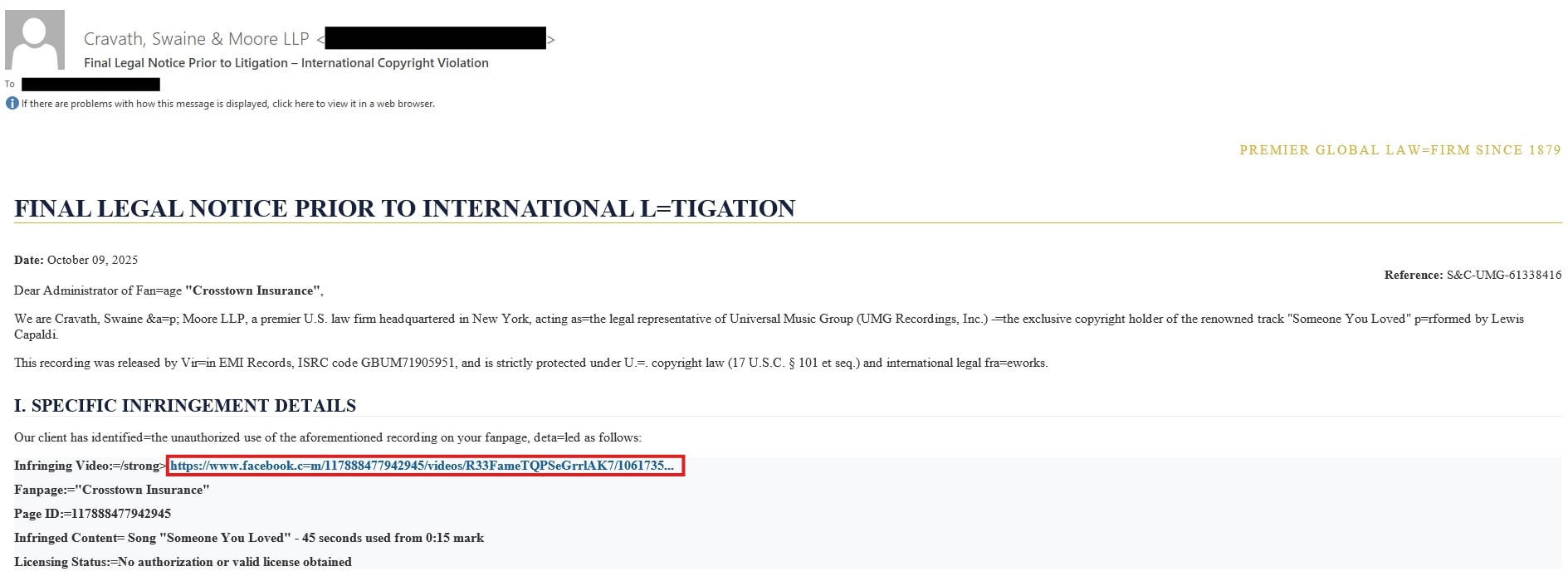
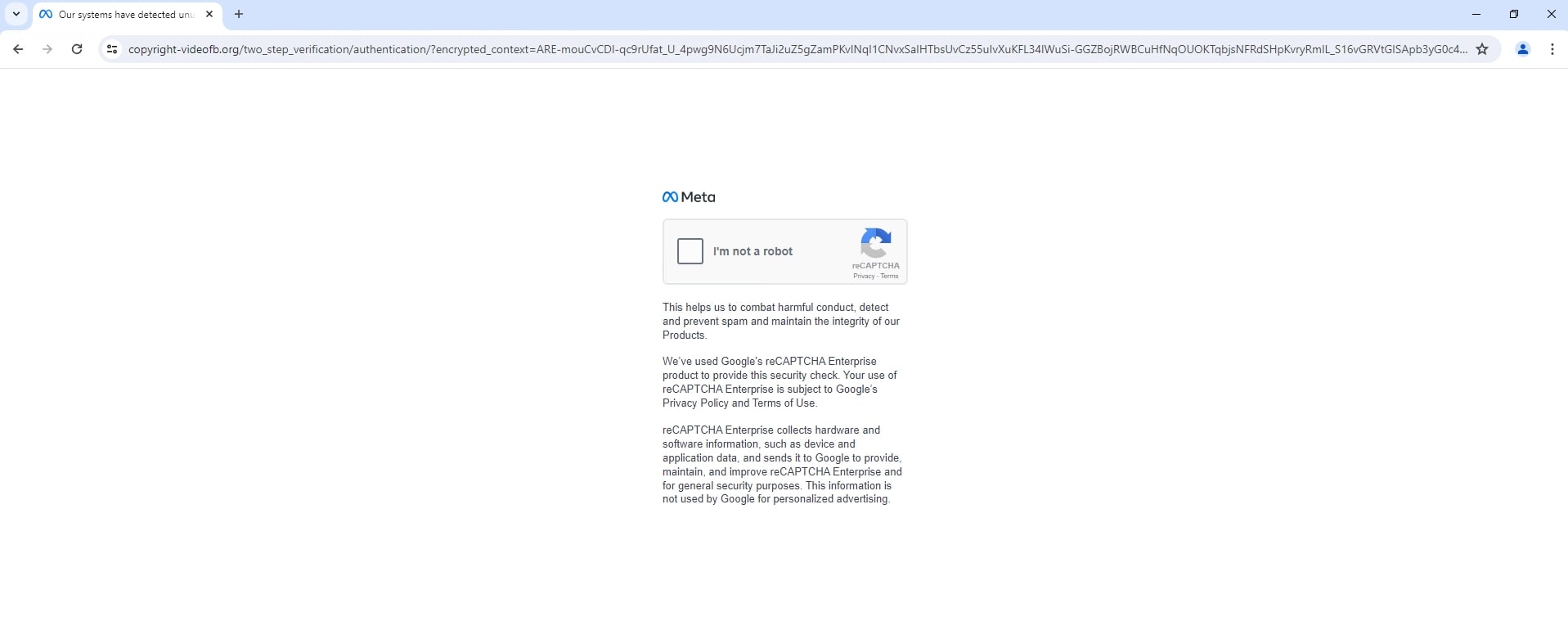
The hyperlink is a shortened URL (hxxps://lnk[.]ink/plBFF) that, once clicked, will redirect to a fake Meta captcha page for additional evasion.
The attack prompts users to log in using a Facebook pop-up window. This is where it becomes tricky, as the pop-up window contains the real Facebook URL, making it appear to be a legitimate login prompt.
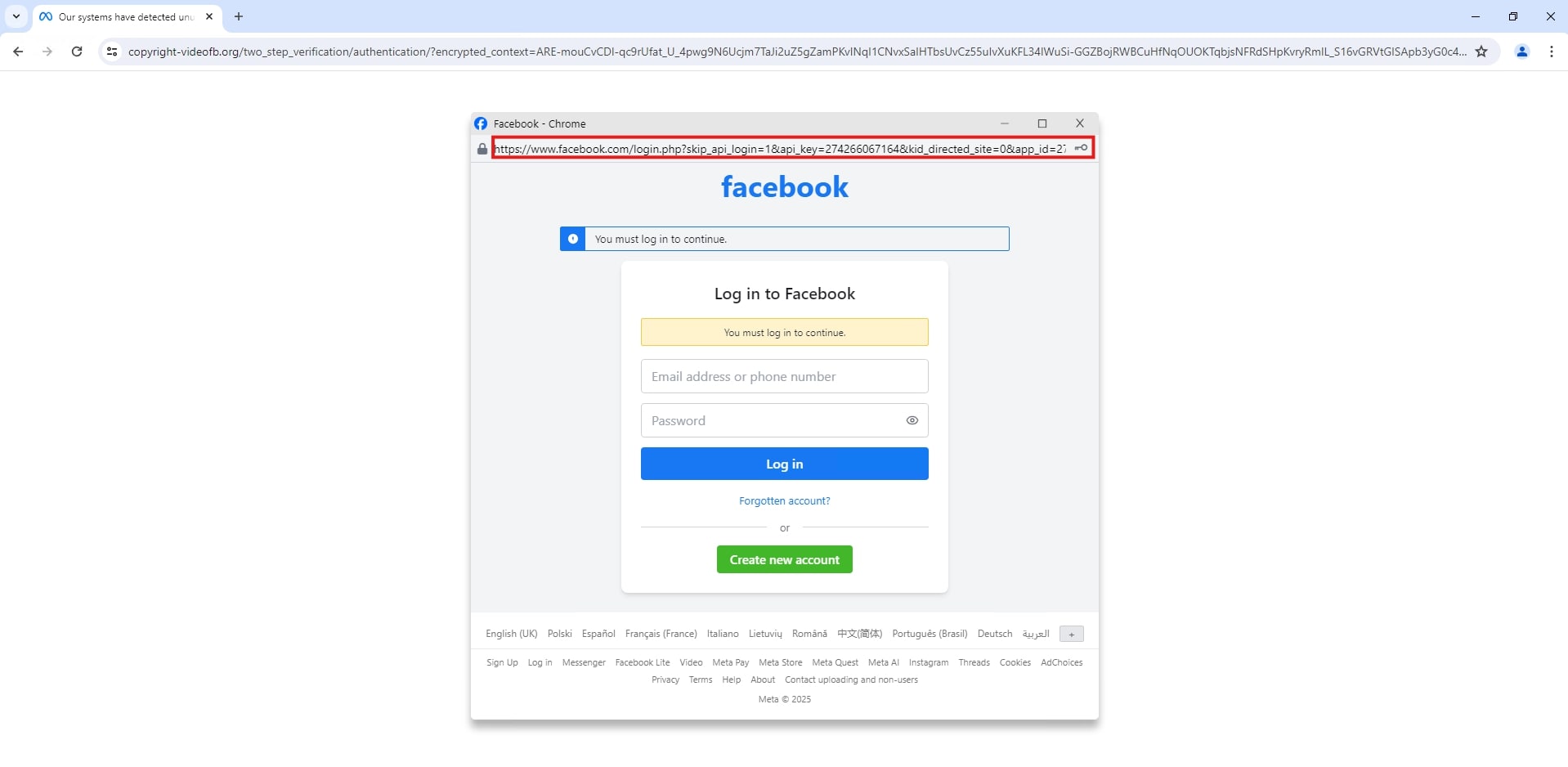
Checking the code reveals that the Facebook URL was hardcoded.

Common Facebook phishing tactics
- Account suspension/violation - Scammers send an email, often featuring a sophisticated Facebook/Meta logo, claiming the victim's account, page, or business account has violated copyright or community standards.
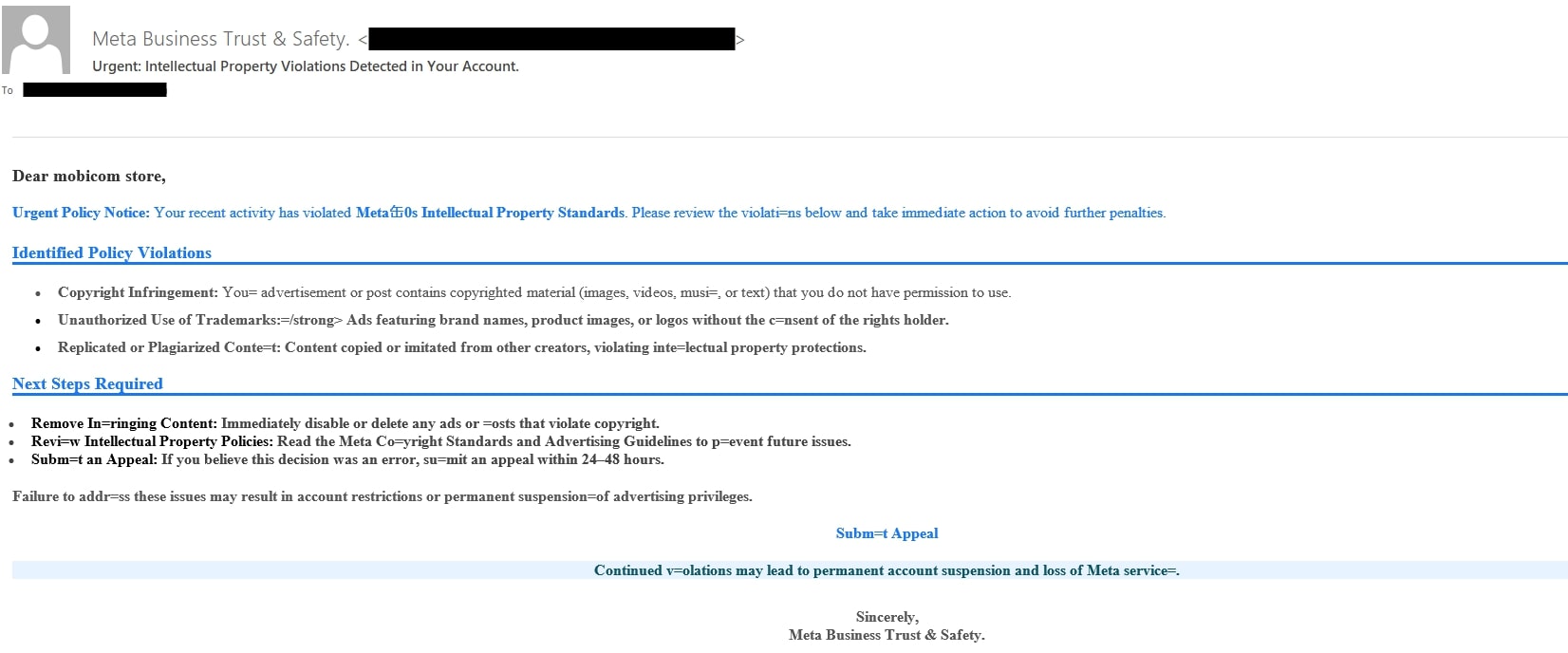
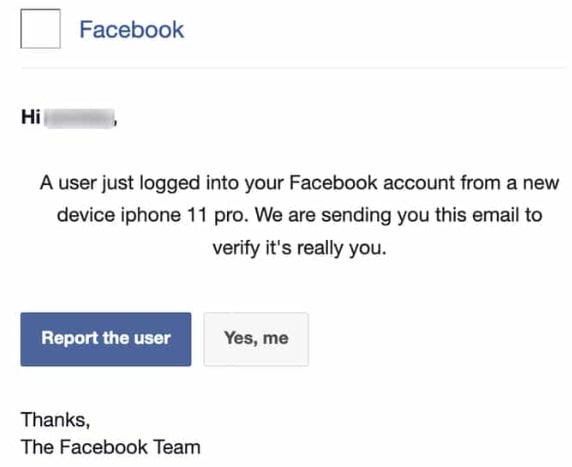
- Unauthorized login alert - The scammer sends an email warning of a suspicious login from an unrecognized device.
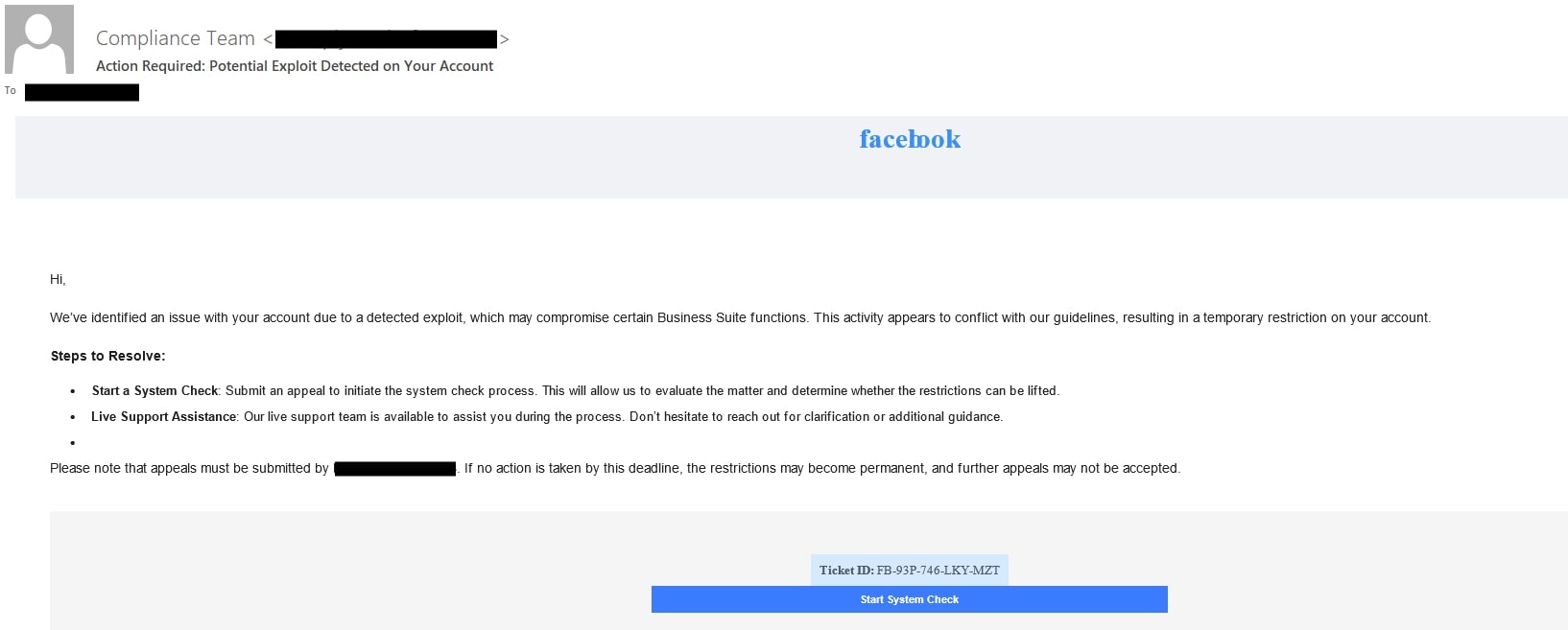
- Security update required/system check - The message claims Facebook is updating its security protocols or has detected a potential threat, requiring immediate re-verification of the user’s identity.
The use of URL shortener and cloud platforms
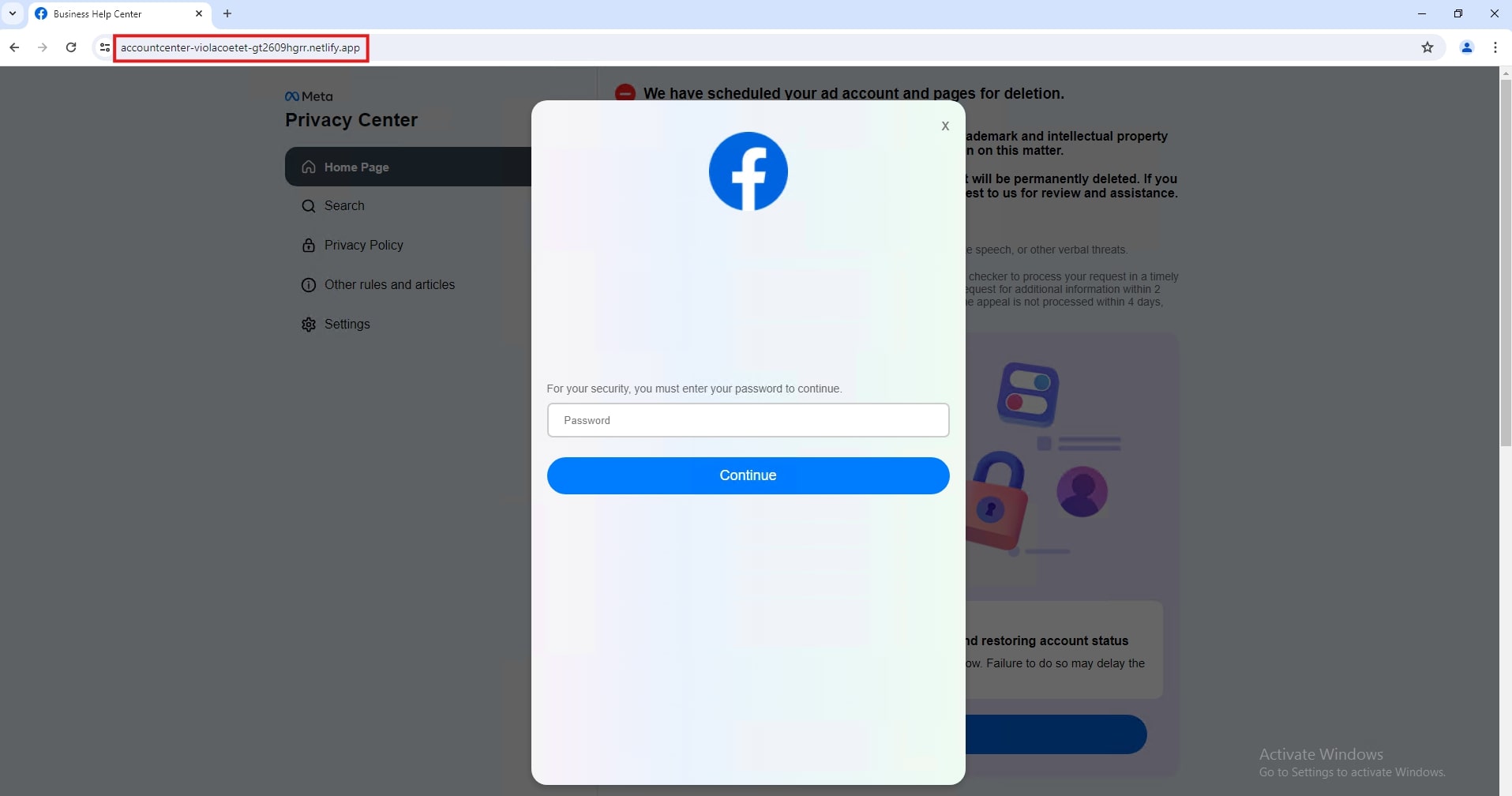
Attackers are now abusing legitimate, trusted features of cloud platforms to deliver their phishing pages and evade security filters. They host their fake login pages on legitimate cloud storage services like Netlify and Vercel.
- Netlify-hosted Facebook phishing - A fake Meta copyright/trademark violation prompts the user to submit an appeal.
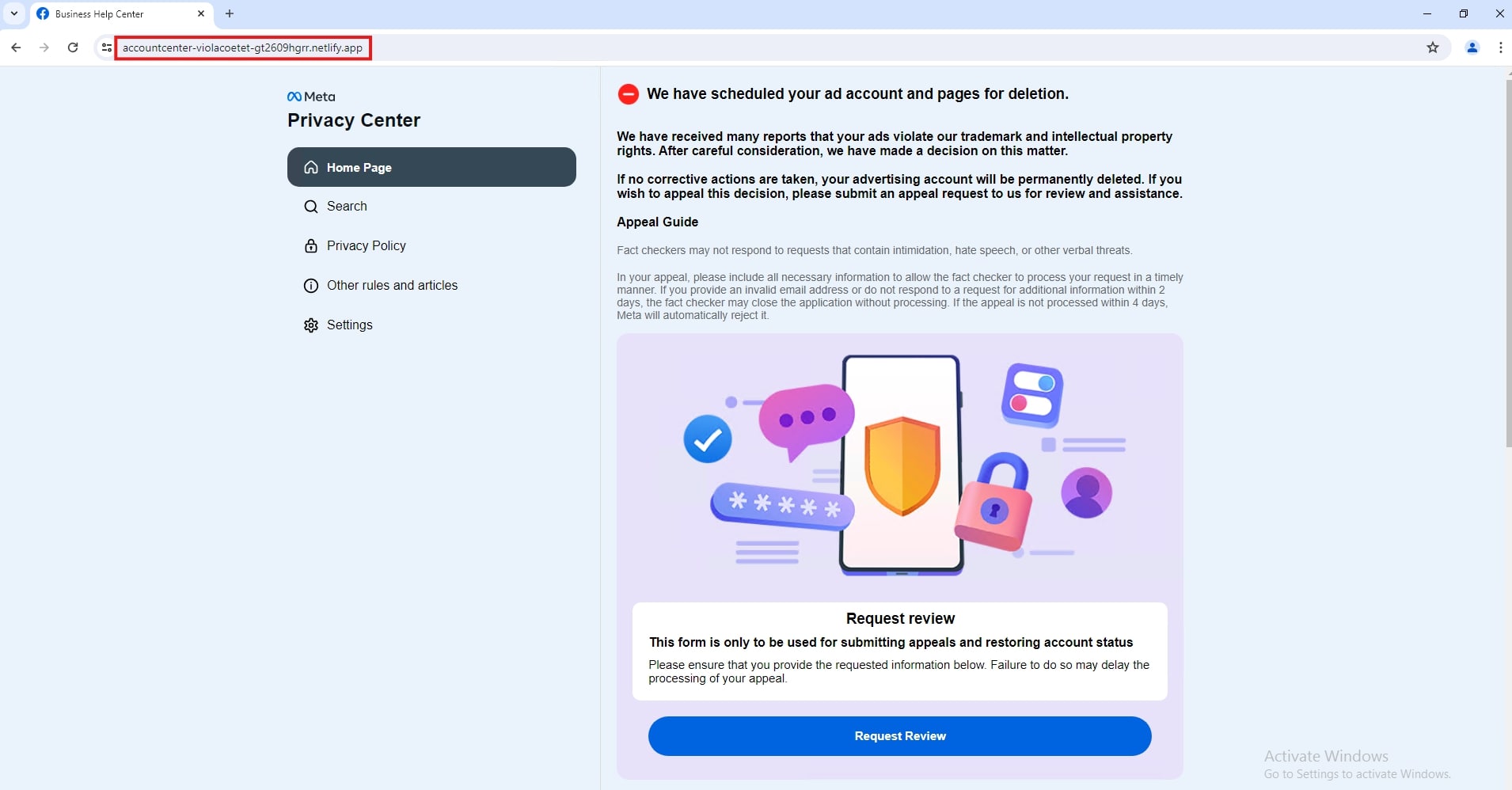
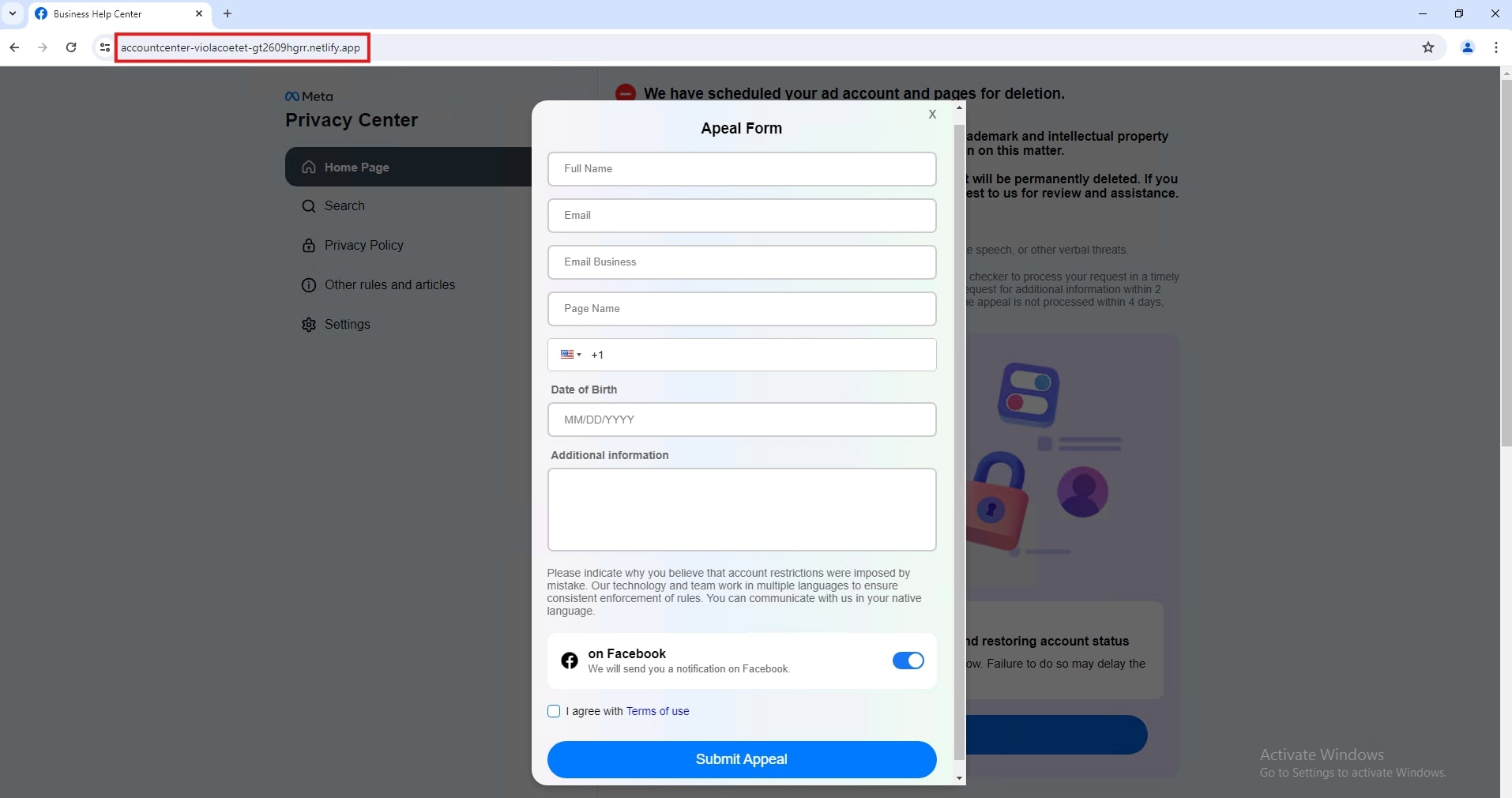
Once the button is clicked, it redirects to an appeal form that initially asks for basic information: full name, email address, page name, phone number, and date of birth.
The final phishing page will ask for the victim's password to continue.
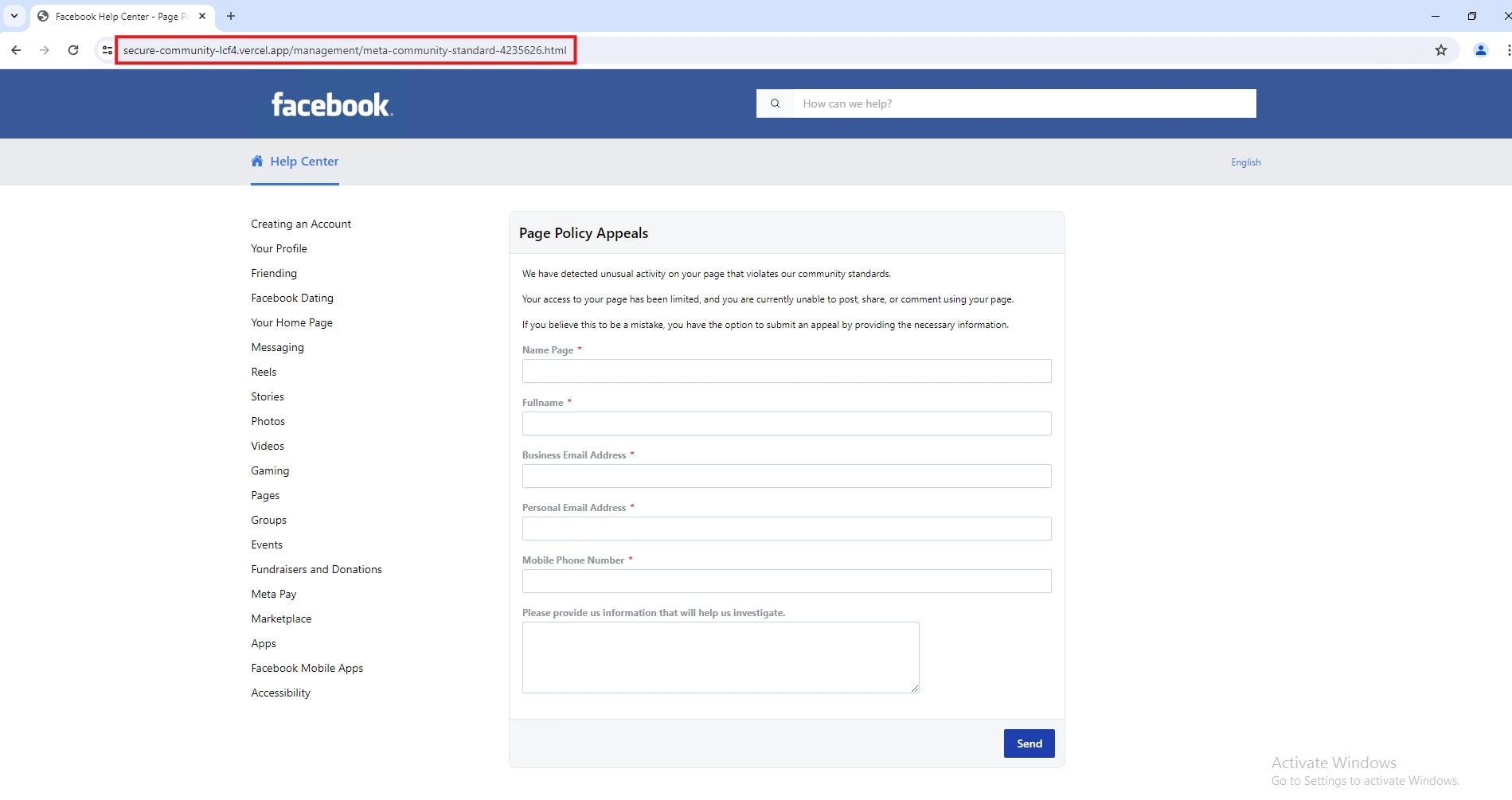
- Vercel-hosted Facebook phishing - The scammer claims unusual activity has been detected that violates Facebook community standards; like the first example, this prompt also initially asks for basic information.
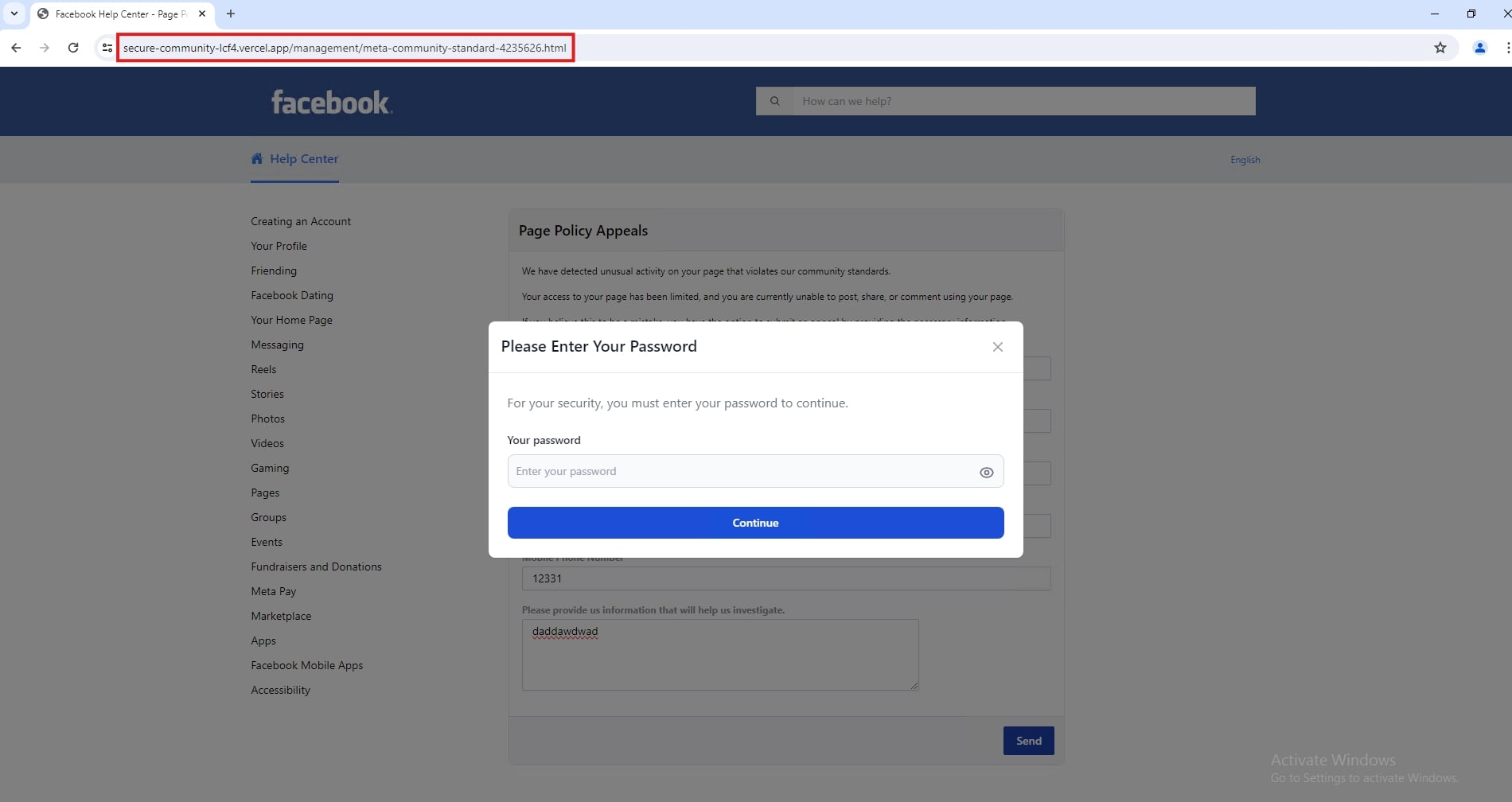
Once the user proceeds, it will then ask the user to enter their account password to continue.
Scammers also use services known for creating redirects or URL shorteners (Lnk[.]ink, rebrand[.]ly) to mask the final phishing destination and evade security filters.
Conclusion
The threat of Facebook phishing is escalating and becoming highly sophisticated, moving far beyond easily recognizable malicious links. Attackers are successfully exploiting the platform's massive user base by employing advanced social engineering and technical evasion tactics.
The key shift lies in the abuse of trusted infrastructure, utilizing legitimate cloud hosting services like Netlify and Vercel, and URL shorteners to bypass traditional security filters and lend a false sense of security to phishing pages. Most critically, the emergence of the Browser-in-the-Browser (BitB) technique represents a major escalation. By creating a custom-built, fake login pop-up window within the victim's browser, this method capitalizes on user familiarity with authentication flows, making credential theft nearly impossible to detect visually.
This evolution signifies that standard security awareness is no longer sufficient. A multi-layered defense strategy, combining heightened user vigilance with proactive platform security measures, is essential to combat these highly deceptive and technically complex phishing campaigns.
Recommendation
Based on the observed surge in sophisticated tactics, the following recommendations are crucial for both users and platform security teams:
For users and account holders
- Implement two-factor authentication (2FA): This is the single most effective defense against credential theft. Even if hackers steal credentials via BitB or a fake page, 2FA prevents account takeover.
- Navigate directly to Facebook: Never click a link in an email—especially not for claims of account suspension, copyright violation, or unauthorized logins. Instead, manually type facebook.com into the browser or use the official Facebook app to check for notifications and account status.
- Scrutinize the URL bar: Before entering credentials, always check the full URL in the address bar. Be suspicious of links that point to services like netlify.app, vercel.app, or known URL shorteners, especially if a phishing domain precedes them or if the URL does not belong to the official facebook.com domain.
- Treat all login pop-ups with extreme caution: Assume that any login window appearing inside the current browser window (the BitB technique) is fake. Genuine logins almost always redirect the browser to a dedicated, full-page login URL or use the browser's integrated password manager.
For platform providers (Meta) and security developers
- Proactive cloud host monitoring: Develop automated systems to continuously scan and flag suspicious content (phishing kits, login forms) hosted on trusted cloud services (Netlify, Vercel, etc.) that are known to be abused. Establish rapid, automated takedown agreements with these platforms.
- Enhanced redirect and URL shortener filtering: Implement smarter backend filters that analyze the final destination of URL shorteners (Lnk[.]ink, rebrand[.]ly) and block traffic to known malicious endpoints before the user clicks.
- Mitigation of BitB attacks: Investigate browser or client-side warnings/indicators that can alert users when an in-browser window is not a legitimate operating system or browser pop-up. This requires advanced detection of simulated browser chrome.
- Targeted user education campaigns: Regularly update security education with specific examples of the current threats, focusing on visual deception (BitB) and the appearance of legitimate-looking URLs hosted on legitimate cloud infrastructure, rather than generic warnings.
Trellix protection
| Product | Coverage |
| Email Security (EX) | Faude_Fastpath_YARA_Phishing_Meta_Community Faude_Fastpath_YARA_Phishing_Meta_Vercel Faude_Fastpath_YARA_Phishing_Meta_Violation Faude_Fastpath_YARA_Phishing_Meta_PagesDev Phishing_Meta_Delay_Evasion_Page Phishing_Meta_Violation Phishing_Meta_Violation_1 Phishing_Meta_Violation_2 Phishing_Meta_Violation_3 Phishing_Meta_Violation_5 Phishing_Meta_Violation_6 Phishing_Meta_Badges_Verify |
Indicators of Compromise (IoCs)
| Meta phishing domains |
| report-copyright-metaplanet[.]net |
| supportmeta-horizon[.]net |
| supportmeta-horizonusa[.]org |
| performance-guidance-hub[.]pages[.]dev |
| randalli-clifford[.]pages[.]dev |
| copyright-videofb[.]org |
| secure-community-lcf4[.]vercel[.]app |
| casefb126765-be7a[.]vercel[.]app |
| casefb921134-lflp[.]vercel[.]app |
| casefb183711-jcw7[.]vercel[.]app |
| casefb814915-uzsa[.]vercel[.]app |
| talentbymetaal[.]vercel[.]app |
| 8gu8-casefb020219[.]vercel[.]app |
| ads[.]pageverifybusiness[.]cfd |
| meta[.]user-support-business[.]cfd |
| page[.]user-support-business[.]cfd |
| ads[.]active-page-policy[.]cfd |
| center[.]active-page-policy[.]cfd |
| meataconnects[.]cfd |
| eclectic-cupcake-fd4922[.]netlify[.]app |
| accountcenter-lawtrackma-qer2209wrw[.]netlify[.]app |
| accountcenter-forbendro-sdf2509xcv[.]netlify[.]app |
| accountcenter-violacoetet-gt2609hgrr[.]netlify[.]app |
References
https://cyberpress.org/new-phishing-scam-imitates-facebook-login-page/
https://x.com/GenThreatLabs/status/1948386664402784676
Discover the latest cybersecurity research from the Trellix Advanced Research Center: https://www.trellix.com/advanced-research-center/
RECENT NEWS
-
Mar 02, 2026
Trellix strengthens executive leadership team to accelerate cyber resilience vision
-
Feb 10, 2026
Trellix SecondSight actionable threat hunting strengthens cyber resilience
-
Dec 16, 2025
Trellix NDR Strengthens OT-IT Security Convergence
-
Dec 11, 2025
Trellix Finds 97% of CISOs Agree Hybrid Infrastructure Provides Greater Resilience
-
Oct 29, 2025
Trellix Announces No-Code Security Workflows for Faster Investigation and Response
RECENT STORIES
Latest from our newsroom
Get the latest
Stay up to date with the latest cybersecurity trends, best practices, security vulnerabilities, and so much more.
Zero spam. Unsubscribe at any time.