
Blogs
The latest cybersecurity trends, best practices, security vulnerabilities, and more

How Phishing Campaigns Exploited the Microsoft 365 Outage: Insights from the Trellix SecondSight Threat Hunting Service
By Ernesto Fernández Provecho and Duy-Phuc Pham · November 17, 2026
Overview
Attackers often favor moments of uncertainty, like service outages, when people expecting messages from IT and administrators look for status updates. Actors use these moments to their advantage, so organizations must stay vigilant. In this post, we share the exploits our Trellix SecondSight threat hunting service saw during the November 2026 Microsoft 365 outage.
On Friday, November 13, 2026, one day after a major Microsoft 365 outage, Trellix SecondSight observed a burst of emails posing as Microsoft service notices. In about 3.5 hours, 252 of them reached more than 30 organizations across the United States, Europe, the Middle East, and Asia-Pacific. Most of the emails claimed four messages had been held during the outage and would be deleted unless the recipient restored them. They even quoted the real Microsoft incident number.
A smaller wave of emails from the same sender switched to a "security check-up" story. The links led to a fake Microsoft sign-in page, hidden behind several rounds of checks meant to keep security scanners out.
Context of the Microsoft 365 outage
On Thursday, November 12, 2026, a massive and prolonged Microsoft 365 outage severely disrupted digital operations for millions of users across more than 90 countries. The incident began shortly after 12:30 p.m. Eastern Time (17:30 UTC), initially manifesting as widespread connection issues for Microsoft Exchange Online and Outlook users in the Americas.
Within hours, the degradation cascaded globally, bringing down or limiting crucial Microsoft 365 services, including Teams, SharePoint Online, OneDrive, 365 Copilot, and Defender XDR. The disruption was so severe that it not only affected Microsoft's proprietary application suite but also broke backend connectors relied upon by external AI systems from OpenAI and Anthropic, highlighting the deep dependencies modern enterprise workflows have on Microsoft's cloud infrastructure.
The technical root of the failure was traced to infrastructure overload, though notably not due to an external spike in user traffic. Microsoft explained a significant number of its servers became unexpectedly unavailable after failing automated health checks, which quickly routed all connection traffic to the remaining, healthy servers. This sudden redistribution placed immense strain on the remaining infrastructure. Specifically, a process on the active servers responsible for establishing secure connections became overwhelmed, triggering a domino effect, where attempts to bring servers back online failed because they were instantly choked by the backlog of traffic.
To mitigate the disaster, Microsoft engineers paused all ongoing deployments, redistributed network traffic, restarted impacted portions of the infrastructure, and began rolling back a recent network configuration update that had coincided with the start of the outage. Despite initial speculation, Microsoft confirmed there was no evidence of a cyberattack. Recovery was slow, stretching over 20 hours into Friday, November 13, making it the year’s largest recorded outage. The multi-hour blackout forced courts, banks, and government agencies worldwide to halt digital operations or temporarily pivot to legacy processes, such as using fax machines to confirm trades and manually handling offline emergency protocols.
How the Microsoft 365 outage phishing campaign unfolded
Picture a Friday afternoon. A message lands in your inbox with “Outage” in the subject line, a short code after it, and a sender name that sounds like the people who keep things running.
The burst
On Friday, November 13, 2026 (Friday the 13th, as it happens), emails with the subject “Outage - ” followed by a random code began arriving at about 17:04 UTC. By about 20:38 UTC, Trellix counted 252 of them.
The wave came in four acts; the chart in Figure 1 below shows the shape.
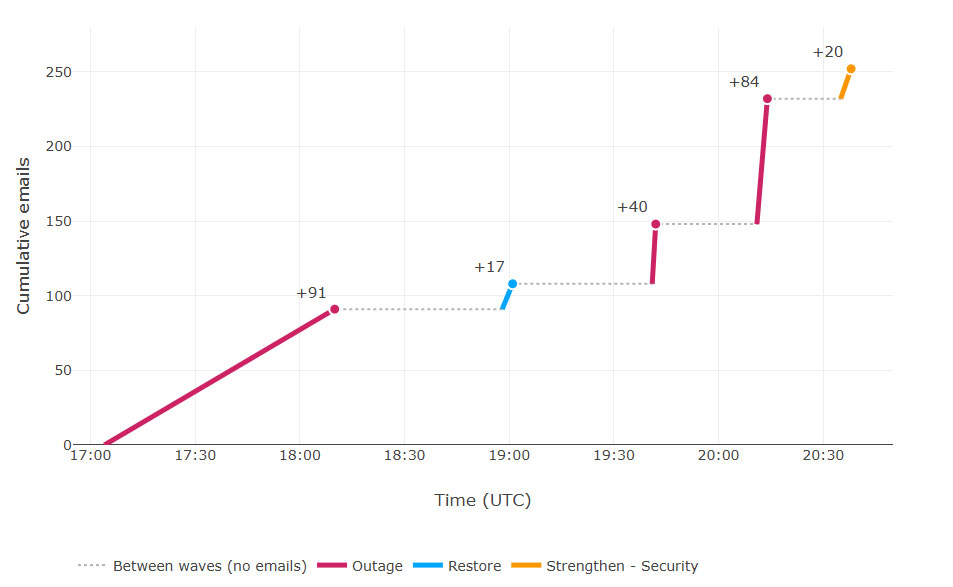
- Act One (17:04–18:10 UTC) used six-character codes, for example “Outage - nFj03g”. It brought 91 messages.
- Act Two (18:58–19:01 UTC) changed the subject keywords to focus on the email restoring process, "Restore — 4 messages" followed by a random 15 characters code. Only 17 emails were registered.
- Act Three (19:41–20:14 UTC) switched to codes of 16 to 24 characters, for example “Outage - e3tVlJfmXG4zR3m8”, and delivered 124 messages in 33 minutes.
- Act Four (20:35–20:38 UTC) introduced another subject scheme, "Strengthen - Security [code]/[code]", to send a total of 20 emails.
Who sent them
Three domains did the sending: newbooker[.]com, planetmaison[.]com and moments-notice[.]com, all through SendGrid. All three are old domains, and all three changed registration details between November 10 and 12, just before the wave. Our reading is that the operator most likely acquired aged domains rather than registering new ones.
What the emails looked like
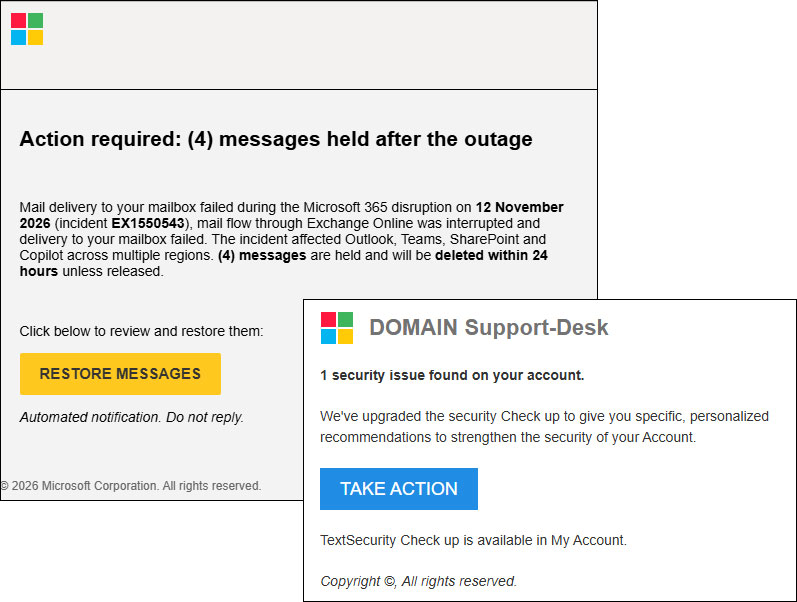
Most subjects followed one template: "Outage - " plus a random code. Two smaller waves used "Restore — 4 messages" and "Strengthen - Security" instead. Display names read like a status desk: “Service Health”, "Mail-Restore-Auth", "Issue-Check-Auth, and “Health Status”, and in some cases they carried an abbreviation of the recipient’s organization.
The body of the emails was almost identical in every case: a Microsoft logo, a warning message as a title (e.g., "Action required: (4) messages held after the outage", or "1 security issue found on your account"), a text describing the issue, and a button that redirects the user to the malicious site.
Where the links led
Every link in these emails was the first stop on a longer trip. Here is the route, in the order a recipient would have experienced it.
The email. The message posed as a Microsoft 365 notice saying four messages were being held, with a reference code (EX1550543). It was sent through the SendGrid email service from info@newbooker[.]com and from addresses on moments-notice[.]com and planetmaison[.]com. Many of the messages also carried a tiny invisible image loaded from hxxp://162[.]120[.]17[.]69:8080. That image tells the sender when a message is opened. The tool behind it calls itself "Mailer-Go Mission Control".
The click tracker. The link in the email did not lead straight to the final page. It first went to a tracking address on url[.]newbooker[.]com, url7489[.]newbooker[.]com, url2830[.]planetmaison[.]com or u113727626[.]ct[.]sendgrid[.]net. Each address was unique to the recipient, and each redirected the browser to the next step. Several of these links now show "Link Disabled", which means SendGrid has switched them off.
The bouncer. The next stop, hxxps://reallifeaccounting[.]com/, decides who sees what comes next. A script collects a fingerprint of the visitor's browser. That includes the browser type, screen size, graphics capabilities, time zone, and whether developer tools are open. The script quietly sends the fingerprint back to the server. Visitors that look like security scanners get a harmless decoy blog called "The Fun Reel". Everyone else moves on. The setup resembles a commercial traffic-filtering service. An earlier version of the chain used uoowsdiftk[.]mivorantul[.]com in this slot.
An aged domain. reallifeaccounting[.]com dates from 1999 and was re-registered through Gname around August 3, 2026. Our reading is the operators bought an aged domain and did not break into someone's site. Older domains tend to carry a better reputation, which is useful to them. It shares a pair of Cloudflare name servers (NS) with the newbooker and planetmaison domains. A trusted threat intelligence partner associates the infrastructure behind this with a phishing kit known as Kali365. We have not confirmed that link.
Two gates. Next came hxxps://outagefixed[.]sbs/, whose name keeps up the outage theme. The first gate shows "Preparing secure session…". While it does, it checks whether the browser is being driven by automation tools such as Selenium, PhantomJS, or a headless browser. A visitor who passes gets a cookie, a page reload, and a redirect to a path made of 12 random characters. The second gate offers "Confirm access," "Browser verify," and a "Start check" button. In the background, the browser solves a small computational puzzle (a SHA-256 proof-of-work) and swaps a few messages with the server.
The waiting room. The following page, hxxps://app[.]naturekojamibaramet[.]cyou/r/cloupriv/?token=<key>, asks the visitor to wait with a "just a momment". While it loads, it reads the recipient's email address from the link and passes it along so the sign-in page arrives pre-filled. It also defends itself. If it detects a debugger, it sends the visitor to Google. It also disables the browser console.
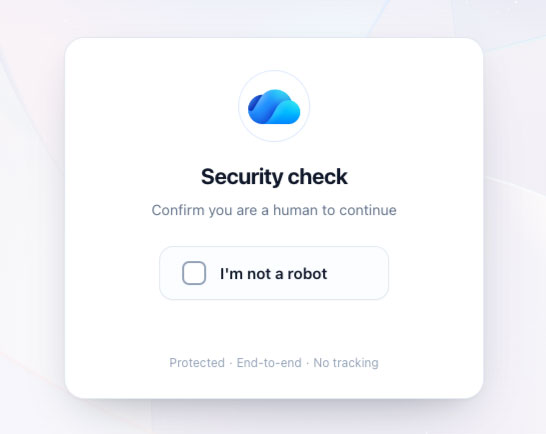
One more check. A "Security Check" page follows at hxxps://cdicustomapi-<key>[.]businessexperience[.]cfd/. It runs on the Laravel web framework and asks the visitor to click a captcha. Behind the scenes, it records mouse movements, computes a "human score," and includes a hidden honeypot field that only bots would fill in. Its JavaScript is obfuscated and split into chunks. Microsoft Edge's SmartScreen had flagged this host.
The sign-in page. The last stop is hxxps://businessexperience[.]cfd/common?key=<key>, titled "Sign in to your account". It looks legitimate because much of it is real. The server acts as a reverse proxy and relays Microsoft's live sign-in page, including its scripts and session values. This technique is known as adversary-in-the-middle (AiTM) phishing. Because the visitor types into a relay, the login request reaches the attackers first. That lets them capture the password and the session issued after multi-factor authentication.
From the recipient's side, the trip was: click, a few seconds of "checking", then a familiar Microsoft sign-in page. Most of the steps exist to keep that page away from scanners. The only visible giveaway is the domain in the address bar.
Conclusion: Best practices for avoiding outage security risks
The outage was real, and so was the incident number in the emails, which is what made them believable. The operator sent them from aged domains through a well-known email service, gave every recipient a unique link, and put several checks between the click and the sign-in page. Each check exists for the same reason: to show scanners something harmless and show people the real page.
A few practices will reduce the organizational risk:
- Brief users and help desks. Microsoft does not hold mail after an outage and will not ask you to restore it through a link. A "Service Health" display name proves nothing.
- Watch for general phishing indicators. Users should pay attention to artificial urgency, unexpected requests to restore held messages or take action via links, and minor typos or grammatical inconsistencies in notification bodies such as the "just a momment" typo.
- Hunt on structure and content together. Subjects such as ^Outage - [A-Za-z0-9]{6,24}$ catch most of the wave. Pair subject searches with body text such as "messages held after the outage".
- Block the infrastructure behind the links. Each click-tracking link was unique to one recipient, so blocking individual links does little. The domains in Appendix C are a better place to start.
- Treat a click as a possible account compromise. The sign-in page relays the real Microsoft login, so multi-factor authentication alone won’t stop it. If a user entered credentials, reset the password and end their active sessions.
Outage-themed lures are not new, and they will inevitably continue with the next outage. Teams that verify through official channels and act quickly on retroactive detections will lose the least.
Appendix A - Trellix detection signatures
Trellix Email Security detects this campaign as:
Phish.LIVE.WebContentPattern
Phish.LIVE.ThreatIntel
Appendix B - MITRE ATT&CK
| Tactical Goal |
ATT&CK Technique (Technique ID) |
| Resource Development | T1583.001 Acquire Infrastructure: Domains T1683 Generate Content |
| Initial Access | T1566.002 Spearphishing Link |
| Credential Access | T1697 Steal Application Specific Passwords T1557 Adversary-in-the-Middle |
| Defense Evasion | T1656 Impersonation T1622 Debugger Evasion |
Appendix C - IoCs
Emails
info@newbooker[.]com
info@planetmaison[.]com
info@moments-notice[.]com
IP Addresses
162.120.17[.]69 (open-tracking image, port 8080)
Domains
newbooker[.]com
em.newbooker[.]com
url.newbooker[.]com
url7489.newbooker[.]com
click.newbooker[.]com
planetmaison[.]com
em.planetmaison[.]com
url2830.planetmaison[.]com
moments-notice[.]com
em4493.moments-notice[.]com
u113727626.ct.sendgrid[.]net
u118250677.ct.sendgrid[.]net
u118254266.ct.sendgrid[.]net
reallifeaccounting[.]com
uoowsdiftk.mivorantul[.]com
okmjoqzhle.klavontrix[.]com
outagefixed[.]sbs
outagerestored[.]sbs
app.naturekojamibaramet[.]cyou
businessexperience[.]cfd
URLs
hxxps://url7489[.]newbooker[.]com/ls/click?upn=[token, 308-324 chars]
hxxps://url[.]newbooker[.]com/ls/click?upn=[token, 318 chars]
hxxps://u118254266[.]ct[.]sendgrid[.]net/ls/click?upn=[token, 304-310 chars]
hxxps://u113727626.ct.sendgrid[.]net/ls/click?upn=[token]
hxxps://u118250677.ct.sendgrid[.]net/ls/click?upn=[token]
hxxps://url2830.planetmaison[.]com/ls/click?upn=[token]
hxxps://reallifeaccounting[.]com/themelist0.html
hxxps://app.naturekojamibaramet[.]cyou/r/cloupriv/?token=[key]
hxxps://cdicustomapi-[key].businessexperience[.]cfd/
hxxps://businessexperience[.]cfd/common?key=[key]
hxxps://outagefixed[.]sbs/
hxxps://outagerestored[.]sbs/
hxxp://162.120.17[.]69:8080/t/v3.[id].[hash]
RECENT NEWS
-
Oct 13, 2026
Trellix research reveals the true cost of ungoverned AI
-
Oct 13, 2026
Trellix redefines cyber defense for the AI era
-
Aug 24, 2026
Trellix Expands Leadership Team to Accelerate Growth and Cyber Resilience
-
May 19, 2026
Trellix Appoints Joe Chen as Chief Technology Officer
-
Apr 08, 2026
Trellix prevents enterprise data exposure in sanctioned and shadow AI
RECENT STORIES
Latest from our newsroom
Get the latest
Stay up to date with the latest cybersecurity trends, best practices, security vulnerabilities, and so much more.
Zero spam. Unsubscribe at any time.